Company newsletters should not be taken for granted, even if they are “just” for your own employees and coworkers. They can be effective communication tools that keep your team informed, engaged, and entertained if you learn how to do them correctly.

Below you’ll find the pointers, examples, and company newsletter ideas that you can bring back to your team immediately.

Objectives of company newsletter

Before we get into how to write great company newsletters, it’s important to understand what these messages’ goals are and what elements define them.

Why do you want to send your employees newsletters? Employee newsletters are popular in a variety of departments, including Human Resources, Employer Branding, and businesses in general, for the following reasons:

  • To inform. Information intended for affected employees is distributed through company newsletters. Regardless of hierarchical rankings, the information included is relevant and useful for targeted departments and employees.
  • To break down silos. Aside from disseminating pertinent information to all employees, company newsletters can also be used to foster camaraderie among employees who may be separated by cubicles, team designations, or departmental assignments and thus lack a strong sense of everyday belonging.
  • Provide framing and an external narrative. Every employee has a family, friends, and social circle of their own. Explaining why businesses do what they do and providing an easy way for them to be proud and spread the word can be a powerful catalyst for word-of-mouth.
  • Reduce email overload. A company can use the company newsletter as a more efficient distribution of information rather than sending multiple notices, announcements, or acknowledgments to various departments and employee groups.
  • Work together with other communication channels. In addition to other channels, your newsletter can serve as a reference for company information. They can, for example, announce or recognize the accomplishments of a specific team or department. This is typically only found on an intranet, slack, or bulletin board posting.
  • Grease the wheels of employee onboarding. Getting new employees up to speed on what’s going on in the company is just as important for the organization as it is for the new hires. You want your new employees to feel like they’re already a part of the team as soon as possible. Not only because you require their help with one of your major projects. According to a recent study, an effective onboarding process can increase employee commitment by up to 18x. This is something that your company newsletter can help you with.
  • Get feedback and improve employee happiness. It’s easy to lose touch when teams work remotely, with a distributed team spread across multiple locations, or even when teams work in the same location but on different projects. Your company newsletter can assist you in learning more about your employees, maintaining their engagement, and retaining them for a longer period of time. Employee email surveys are an excellent method of gathering feedback. It is important to demonstrate your concern for your employees by acting on the issues raised. Email is one of the tools that can assist you in obtaining feedback and enhancing your happiness and retention.
Elfo MAP

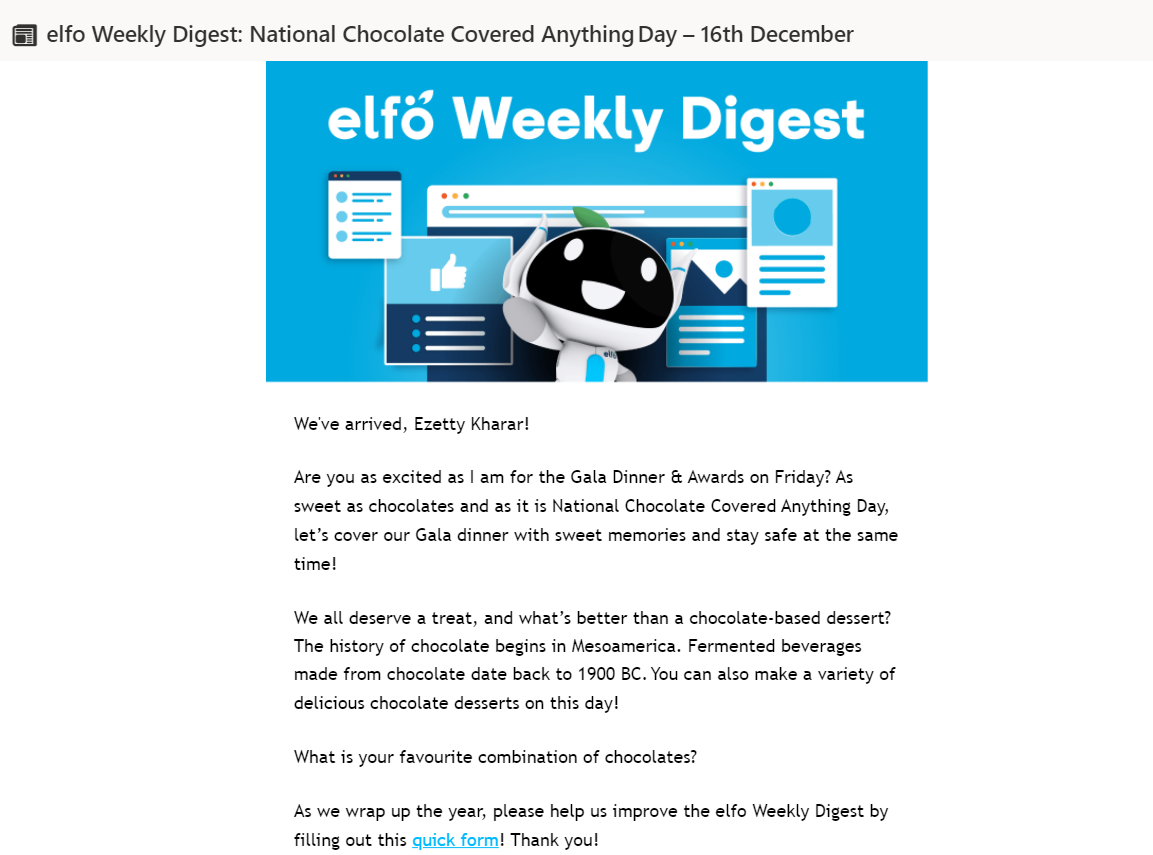
Example of elfo Weekly Digest Newsletter and asking for a feedback in a survey form

  • Improve your products and services. In your company newsletters, you can tickle your employees. Tickle them to give back fresh ideas through surveys – encourage them to participate in different innovative places. Workgroups, Brainstorms or Hackathons. Solutions to the challenges your company is facing are often found by anyone in the company. Email as a fire-starter to get valuable feedback from people across all departments. This includes employees who are not as prone to speak up by themselves or are hard to meet in the corridor.

Employee email engagement is a process that takes time. To accomplish this, you must maintain regular contact with them and make your emails interesting. It also has a bit of sass to it. It’s ideal to have a few “golden topics,” but to rotate them periodically to ensure that your emails are opened and read. Employee newsletters serve a purpose other than business. To jumpstart your internal communication efforts, here are 17 practical and enjoyable company newsletter ideas. The majority of them can be used independently or in conjunction with a company newsletter.

 1. Keep your employee newsletter short and sweet 

Today’s employees are receiving 88 emails a day, so it’s key that your internal newsletter gets – and keeps – employee attention. Your best option is to write shorter sentences that are easy to understand.

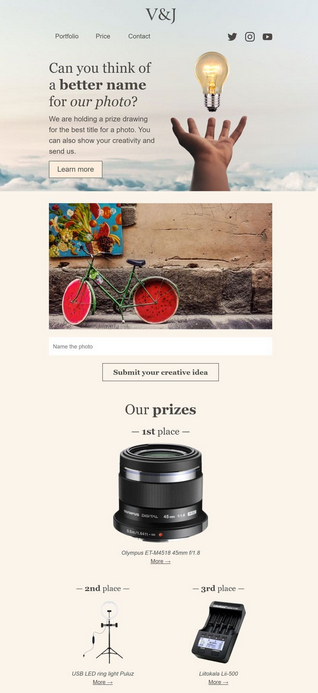
Keep the employee newsletter clean and minimal with great email design. For example, this internal newsletter from Stripo:
Email Marketing Solutions

2. Always provide value to your employees

Your employees should want to read your newsletter. The employee newsletter is your opportunity to take important company and employee news and tie a bow around it.

For instance, you could try these company newsletter ideas for topics: 

  • Include business updates 
  • Share employee news 
  • Report industry trends 
  • Provide links to the latest company blog posts 
  • Announce upcoming events 
  • Promote new customer stories or case studies 

Make your newsletter an indispensable part of your employees routine by consistently delivering important information in an easy-to-digest format is a surefire way to keep your employees’ attention.

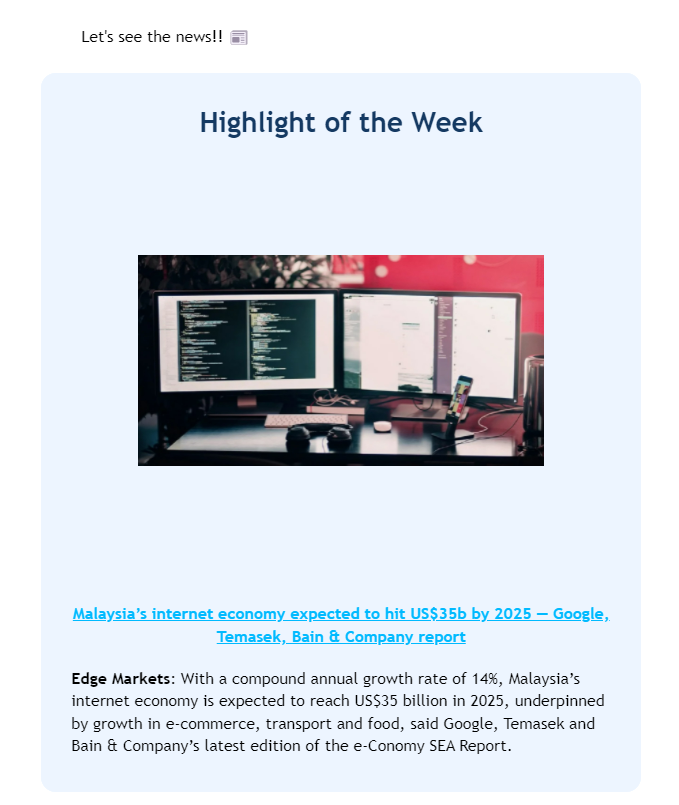
Do you have an internal company blog? Feature a round-up of the top articles featuring employees, product launches, and more within your internal newsletter. Here’s an example of elfo weekly digest newsletter that highlight news update of the week.
Internet Marketing Automation Software

3. New team member announcement

Is someone new joining the team? Take this chance to present their profile and let them say a few words about themselves. A new member intro shouldn’t read like a resume. Instead, a personal angle usually works better. For example, think about their hobbies, an interesting book they’ve recently read, their favorite music, or how they like to spend their free time.

This will help make a connection with colleagues. It will also encourage employees to reach out and talk to those who share similar interests and hobbies.

elfo newsletter

Ezetty, elfo Technical Writer Intern get to introduced herself in elfo newsletter

4. Commendable feats and milestones

Employees are continuously going above and beyond. Maybe they’ve accomplished something they can be proud of. Use the internal newsletter to notify everyone when a department or project team “accomplishes a remarkable task,” so they can act as an inspiration. For instance, build team spirit, keep employees motivated, and inspire others to contribute to the team’s success.

5. Team Spotlight 

Team spotlights are more common in the workplace, but they aren’t limited to large corporations. Introduce the team, including who’s on it, what they’re working on, and how others can contact them. People aren’t always aware of what other teams are working on, and they don’t always spend their days reading the company wiki. In short, a team spotlight can help your entire company (especially new hires) stay informed and feel like they’re part of something bigger.

 6. Team party 

These days, company retreats, parties, and getaways are very popular. Organizing your team is easy if you have a small group. However, if your company has a few hundred employees, some of whom work abroad, planning everything takes a lot of time and effort. You can avoid some of the hassle by including all of the details about what’s coming and what your team members need to join you on a trip in your employee newsletter. After the event, write a summary, send photos and videos, and solicit employee feedback to make your next company retreat even better.

7. Special day events

You can’t organize team getaways all the time. But why not bring the party to the team. By that, I mean organizing a special day at the office.

You can plan them around special dates, like International Coffee Day, Star Wars Day, or Read a Book Day. Or, you can create your own company events. Here’s an example of a year-end holiday party with elfo talents virtually in Teams:

Automated Email Marketing

8. Competitions and contests

Everyone has at least one (extremely) competitive coworker. However, a healthy dose of competitiveness is always beneficial. You’ll notice that employees have the same drive in their personal lives as they do in their professional lives. Why not use this as an opportunity to have employees compete in a race or other type of competition on behalf of your company? Organize competitions within your organization. 

It should also not be difficult to generate new ideas. Cycling, running, swimming, and other sports may be considered. These could be centered on other interests as well. Cooking, baking, photography, or demonstrating a skill are all examples of demonstrations. People are often surprised at how involved they can become, especially when it involves something they enjoy.

9. Surveys

Gathering feedback is important in all areas of business in order to succeed. On a daily basis, feedback is an important part of team interactions and development plans. An email or online survey is advantageous because it is quick and structured, and it allows you to learn about your employees’ opinions.

Inquire about anything, including company benefits, training opportunities, workplace satisfaction, or a recent company retreat. In addition, “idea box” is a more general term. Online surveys allow you to do something that face-to-face surveys do not: you can make them anonymous. Just make sure people feel safe sharing and aren’t judged based on the outcome.

10. Job openings

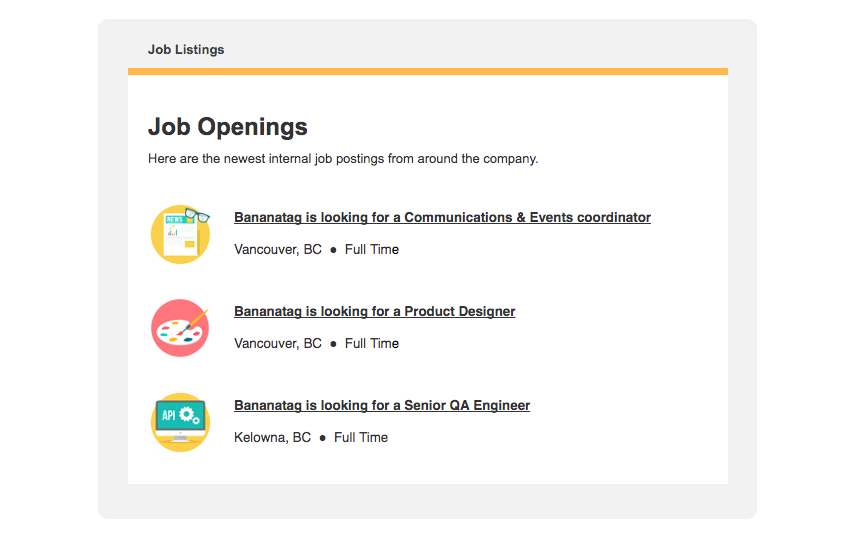
As another way to make your employee newsletters more valuable and engaging, include new job openings in them. We have a proclivity to associate with people who are similar to ourselves. So, if you’re pleased with your employees’ work attitude and performance, chances are their coworkers will be as well. This is especially useful in highly competitive industries (for example, IT Development) or when access to experts is limited. Here is an example of job openings from Bananatag newsletter:
internal newsletter

11. Training opportunities

Another way to help your employees thrive is to keep them informed about new training opportunities. 

This is a no-brainer if you’re already running workshops and trainings, that people can attend. But if you don’t have the budget to hire external trainers, you can try and start the initiative internally. Here’s an example of a workshop training by elfo:

elfoMAP

12. Naturally, all communication does not have to be about perks, benefits, or team outings.

After all, you are in charge of a company. As a result, internal email communication may also centre on issues affecting your company and industry. Send an email ahead of time to your employees if there are any legislative changes, an interesting trend that can help your business grow, or other important company news to communicate.

13. Updates on product and service development

Everyone in your team is affected by your decisions, so it only makes sense to keep them up to date on everything your teams have been working on. To effectively market your product, your marketing team must be aware of what is on the roadmap and what has been released.

If your Customer Service Team is up to date on the latest releases and services, they will be able to better assist your customers. Your sales team will be able to sell more effectively if they have answers or use-cases for your new features. The list could go on and on. It makes sense to keep customers up to date with new products and services. It also demonstrates that people do not need to rely on outside news to keep up with changes.

14. A (personal) message from the board or the CEO

An employee newsletter is a great way to share information about the company’s results, future plans, and forecasts. Because your employees must understand the direction of the company in order to follow the vision.

You won’t be able to meet with everyone one-on-one or even chat with them in the hallway if your company is large; you’ll have to find another way to communicate. For example, in your company newsletter. However, there are times when the news your CEO must deliver isn’t good and must be delivered as soon as possible. If something is having a negative impact on the company and its customers, they need to be aware of it so that they can prepare and understand the correct narrative (internal PR).

15. Sharing company’s history 

New team members require more than just guidance on how to do their jobs well, where to find information, and who to contact for assistance. They should also understand where your company came from, what values it promotes, and what its mission is. While much of that information is already available on your careers page, including it in your onboarding employee communications is a good idea. Sharing amusing photos of the company’s first office will help your new hires feel like they’re a part of the team.

16. Changes in company leadership / employees leaving 

Some companies are hesitant to talk about employee departures. However, in some circumstances, such as when a retiree is being bid farewell, it makes perfect sense to do so. Or when it’s someone in a key position, like the company’s adored evangelist/face of the company/that fantastic intern. When people change positions or leave the company, this is a good way to notify the rest of the company. 

17. Just for fun 

Fun may not appear to have a place in a company newsletter, but it may make more sense than anything else.

Including jokes, puns, and trivia can make your employees’ days brighter. If you do it on a regular basis, say, biweekly, team members may open your newsletter just to see that one segment.

Elements of effective employee newsletters

To write effective company newsletters, the following elements should be taken into account:

  • Target audience. Employees are the intended audience for internal newsletters. This may appear to be a single group, but this is not always the case. What do they want to know and what are they interested in? If you have a large company or a variety of interests represented, consider segmenting your content. On a departmental level, for example.
  • Content relevance. Each email newsletter should have a clear objective. As a result, align the content with the aforementioned objectives. However, readers should not feel as though they were wasting their time by reading (and responding to) your email. Alternatively, email marketing engagement will plummet after a few newsletters.
  • Presentation and format. To make newsletters familiar and easy to read/digest for everyone, use a consistent format. Internal newsletters benefit from having a consistent layout, style, and overall presentation. Use an email template that is both fixed and flexible. Why not plan it out in a grid format? It will save you a lot of time and effort if you get it right the first time.
  • Tone of voice and style. What the company stands for and how it sounds have a large influence on the tone of your voice and the manner in which you speak. It is important to choose a style that is appropriate for business. If you use the right tone, your newsletters will be more engaging and appealing. For example, a company like Red Bull may prefer a different tone than Starbucks, and these differ significantly from, say, a law firm, a non-profit, or the government. It can be lighthearted or serious and formal. A company newsletter is a tangible “representative” of the culture we frequently discuss.
Brand your business with perfect design. Try elfoMap Email Creator that comes with tons of ready-made templates and create professional emails that encourage engagement with your campaigns.

Are you concerned that your emails may not reach your customers’ inboxes? That your business line will suffer as a result of how spam filters assess your messages? Perhaps you’ve already noticed that your emails are being sent to spam rather than your inbox and are looking for assistance.

Don’t worry if you nodded at any of these. We’ve got you covered! This article will not only answer the main question – why do emails go to spam? – but will also suggest strategies to assist you boost your inbox placement rate.

So, without further ado, here are the 12 reasons why some emails end up in spam and what you can do to avoid this in the future.

12 reasons why emails go to spam and what you can do about it

Email Marketing Solutions


1. You don’t have the permission to contact your recipients

Although email marketing has always been permission-based, regulations and the definition of “consent” vary by country.

Because of these distinctions, you’d often hear about marketers who downloaded an email list from the Internet or purchased it from another company, then thought it was fine to send them marketing emails as long as they had the option to unsubscribe. That, however, is no longer sufficient.

Before you begin sending email campaigns, always ensure that you have permission to do so. If you fail to do so, you risk not only having your emails routed to spam, but you may also face a fine.

That’s why if:

  • you’re still filling your email campaigns with contacts from Outlook, Gmail, LinkedIn, or any other place where you’ve interacted with people,
  • you’re an ecommerce business automatically adding people to your list from the checkout page,
  • you’re using a pre-checked newsletter consent checkbox in your web form,
  • buying or downloading email lists from the ‘reputable sites’…

…you should stop right now.

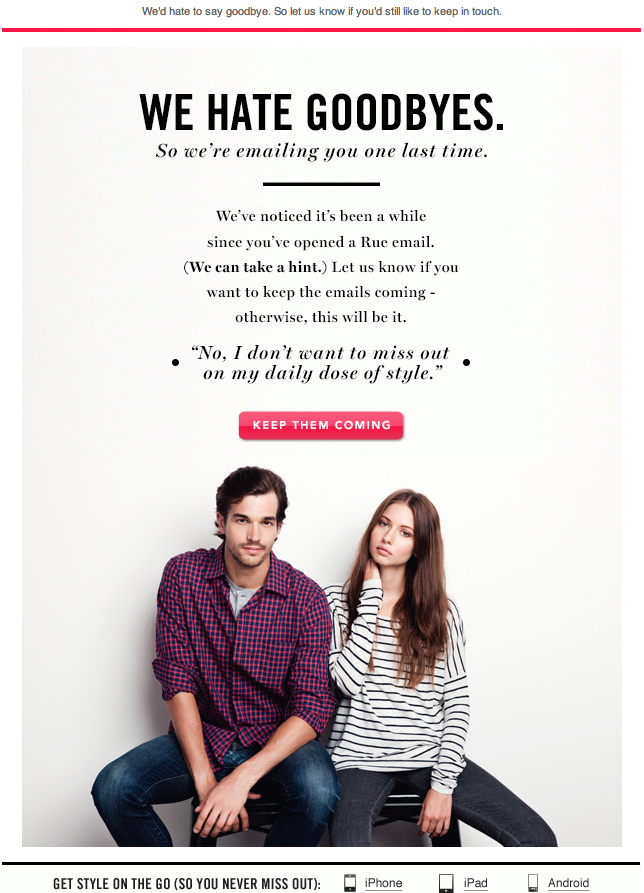
If you’re unsure whether it’s appropriate to contact some of the people in your database, consider running a reconfirmation campaign. By sending an email in which you explicitly ask your audience if they want to remain on your list, you can ensure that only those who are still interested in your offer will remain on the list.

Not sure what these looks like? Here’s one example we’ve received when GDPR came into force:

Email Marketing

Reconfirmation email sent right before GDPR came into force by Rue La La

Pro tip 1: Manage a consent field in your email campaigns. These will allow you to easily store, manage, and view all of the permissions that your contacts have given you.

Pro tip 2: To improve your inbox placement rate and avoid having your emails reported as spam, always exclude (or suppress) contacts who haven’t given you the proper consent. This is especially important if you have contacts in your database who have not agreed to receive marketing emails.

Pro tip 3: If you’re sending the same message to multiple marketing lists, see if your email service provider skips duplicate email addresses automatically. Because not all platforms support it out of the box, use caution if you don’t want to send the same message to your target audience multiple times.

2. It’s not clear what your subscribers are signing up for

Transparency is key, especially when it comes to building your customer base. Users should be fully aware of the type of communication they will receive in the future when filling out your sign-up form.

Make it very clear what you intend to discuss in your emails and then deliver on that promise. When you do this, you will notice that your unsubscribe, and complaint rates will drop. And your sender reputation will improve.

Pro tip 1: Make sure your web form, thank you page, and welcome email all clearly state what your users are signing up for. Doing this early in the subscription process increases your chances of developing strong relationships with your target audience. In addition, your emails will be less likely to be marked as spam.

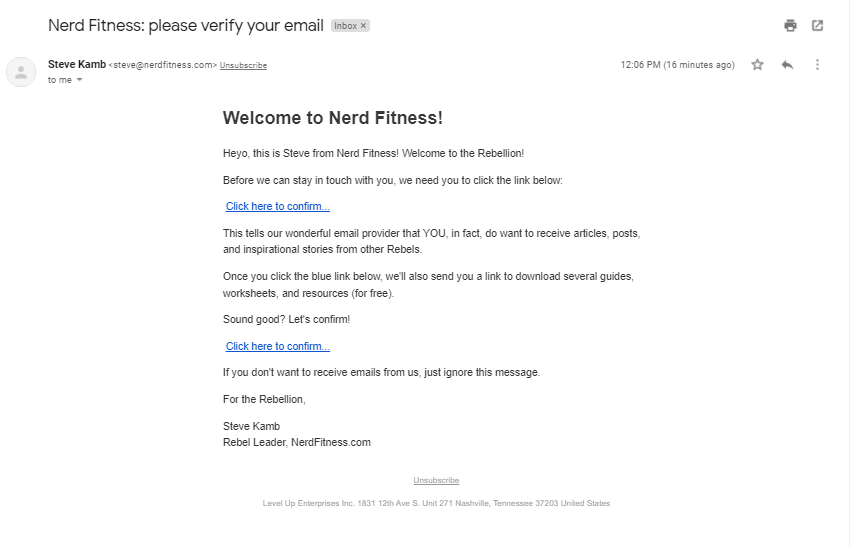
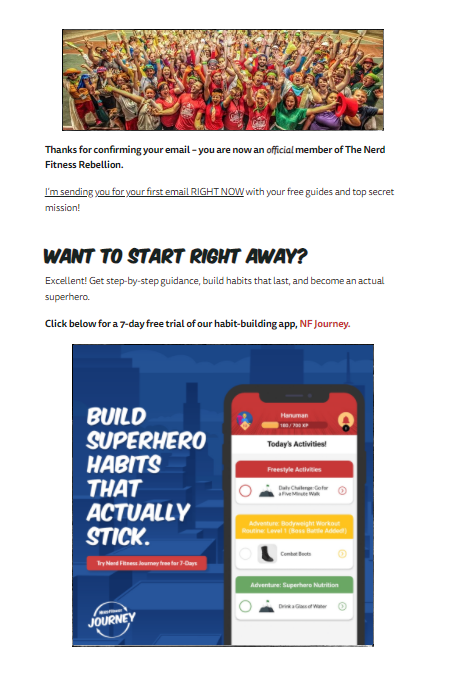
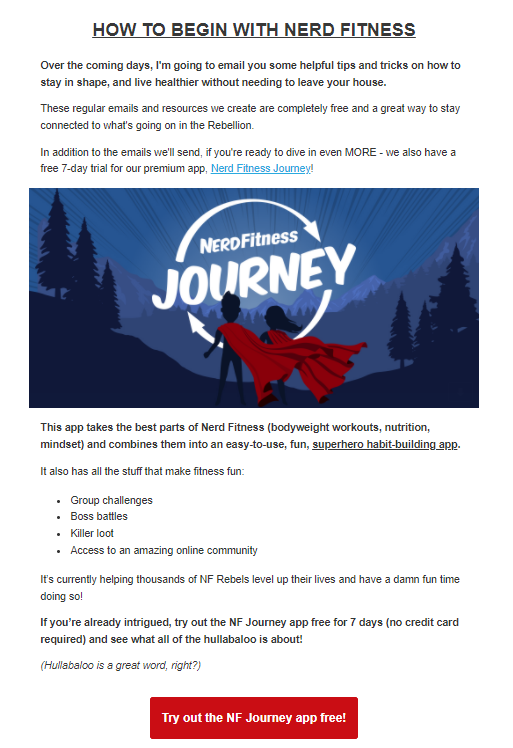
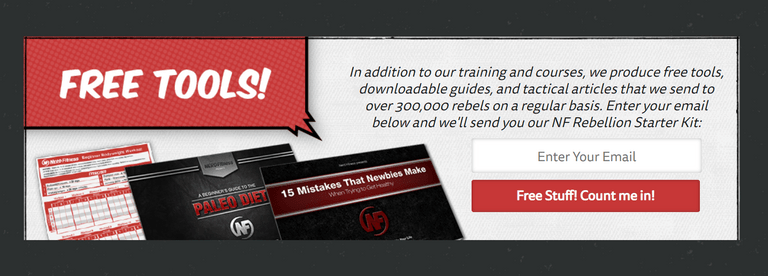
Take a look at this example from a brand called Nerd Fitness. Throughout their sign-up form, thank you page, confirmation email, and subscription confirmation page they’ve made it clear what their newsletter is about, how frequent their communication is, and how the subscriber can make sure to receive the communication in their inbox. Here’s an example from Nerd Fitness:

Email Marketing Automation Tools

Step 1. Sign-up form from Nerd Fitness explaining what we will receive once we subscribe to their newsletter


Email Marketing

Step 2. Confirmation page telling you that you need to click the confirmation link


Email Marketing

Step 3. Subscription confirmation email

Email Marketing

Step 4. Newsletter subscription confirmation page welcoming new subscribers

Pro tip 2: If you want to lower your unsubscribe rate a good idea might be to fill out your email list description visible in your subscriber’s preference center. This will help your audience decide which lists they want to stay subscribed to and which ones they want to opt out from.

3. You’re making it difficult to unsubscribe

This is a major red flag and one of the most common reasons subscribers report emails as spam.

If someone wishes to discontinue receiving marketing communications from a specific sender, the last thing they want to do is waste time looking for a way to unsubscribe. When they find it difficult or lose faith in the message’s ability to be processed successfully, they report it as spam or manually move it to their spam box. The marketer is at a loss in both cases.

Here are some things you should avoid:

  • burying down the unsubscribe link below the main part of your footer (e.g., by adding empty lines on top of it),
  • hiding the unsubscribe link (e.g., by changing the copy or writing in a hard-to-read color),
  • making your recipients contact you to resign from the newsletter,
  • making recipients log into some form of a panel to unsubscribe or change their mailing preferences,
  • taking unreasonably long to process your users’ requests to unsubscribe.

Adding any of the above roadblocks just pushes your emails closer to being marked as spam and being negatively evaluated by Internet Service Providers’ (ISPs’) spam filters.

Pro tip 1: If you’re concerned about an excessively high unsubscribe rate, consider giving your subscribers the option to opt out, reduce the frequency of your mailings, or even pause them for a set period of time (e.g., 90 days).

You can divide your recipients into different groups by using a separate email list or segment or include a brief explanation of why the subscriber is receiving your emails and a reminder of when and how they signed up for your newsletter.

Pro tip 2: If you’re receiving a lot of spam complaints despite following the tips in points 1-3, you could try including an additional unsubscribe link right after the preheader text inside your email message.

This may appear to be a radical move, but having more people unsubscribe from your list is preferable to having them report your messages as spam.

Improve your email deliverability and start sending email campaigns that make the cash register ring with elfoMAP!!

4. You’re not using the right email marketing software

I know it sounds like we’re blowing our own horn, but it’s impossible to overlook an important factor–your email marketing software. Your email service provider also plays an important part in delivering your emails to your subscribers’ inboxes.

Let’s take our example.

Here, at elfoMAP manages your IP reputation, handles bounces, unsubscribes, spam complaints, and creates feedback loops.

Thanks to this, we know when an email address is no longer active, is misspelled, or when the recipient wants to unsubscribe. When we come across such addresses, we remove them from your list so that your deliverability isn’t affected and you don’t have to pay extra for contacts that aren’t useful to your company.

In addition, we check your email lists for common issues as they are imported, automatically assign engagement scores to your contacts to make reengagement campaigns easier, and assist with custom DKIM configuration if you use your own domain.

Pro tip 1: Email authentication is another option worth investigating. Setting up SPF, DKIM, and DMARC will identify you as a recognizable sender to the ISP. By identifying you, they can ensure that you are not impersonating anyone else. It will also assist you in increasing your domain and IP reputation, as well as making all of the good things you do “stick” to your brand.

Pro tip 2: While designing and coding your own emails from scratch works for many out there, one of the common reasons why emails go to spam is that their HTML code isn’t clean.

To avoid that, either hire a developer who’s on top of the email design game specifically (coding for email is very different from coding websites) or use an email maker.

5. You’re sending your email campaigns from a freemail domain (e.g. Gmail or Yahoo!)

Marketers who are just starting out with email marketing often use freemail domains like Gmail or Outlook to send out their newsletters. While it is not illegal, we do not recommend it.

Bulk emails from freemail domains such as Yahoo!, AOL, Gmail, or Mail.ru are often rejected by mailbox providers. ISPs would prefer to receive messages from domains registered by an individual sender, whom they can track back and whose reputation they can evaluate. Tracking down the individual sender is obviously impossible with freemail domains, which may explain why they are frequently abused by scammers and people who want to send out spam on purpose.

So, what should you do instead? All you need to do is create your own company domain or a subdomain under your existing domain to use for email campaigns.

Even if you only use it in the from address and not the mailing domain from which you’re sending your messages, it will help you deliver your message more effectively.

Pro tip: Using tools like the elfoMAP will help you identify such common mistakes as the freemail domain in your from address. By running your newsletters through a spam checker, your chances of reaching the inbox grow considerably higher.

6. Your email frequency is off

As a general rule, you should avoid blasting emails to your entire customer base and instead take a more structured approach. However, we’ll get to that later in this article.

Pro tip 1: Determine the appropriate email frequency by compiling your key email marketing metrics (such as total number of conversions, unsubscribe rates, and bounce rates). Once you’ve determined the best email schedule for your audience, make sure to communicate it to them, for example, in your subscription form or the welcome email.

Pro tip 2: To increase your email frequency without alerting spam filters, begin by contacting your most engaged subscribers first. Suppression lists can be used to exclude segments that are less likely to respond to your email campaigns.

After you’ve successfully engaged your best recipients, you can gradually begin to include those who read your newsletters less eagerly.

Email MarketingSome email marketers may get away with sending out a lot of emails. Even the name of the newsletter suggests that it is a daily newsletter update in this case. This method, however, should be used with caution because it has the potential to backfire. Users can become overwhelmed if they receive too much communication. This will result in an opaque churn. In other words, they will not unsubscribe from your communication, but by ignoring it, they will negatively impact your total email deliverability.

7. You’re not paying enough attention to email list hygiene

Email list hygiene management entails identifying engaged subscribers, re-engaging those who have become unresponsive, and getting rid of those who hold no business value.

And whom do we mean, when we’re saying that they’re holding no business value? Not just those who no longer engage with your communication, unsubscribe, or mark your emails as spam. We also refer to those who have provided incorrect or fictitious email addresses, as well as those who have abandoned their mailboxes.

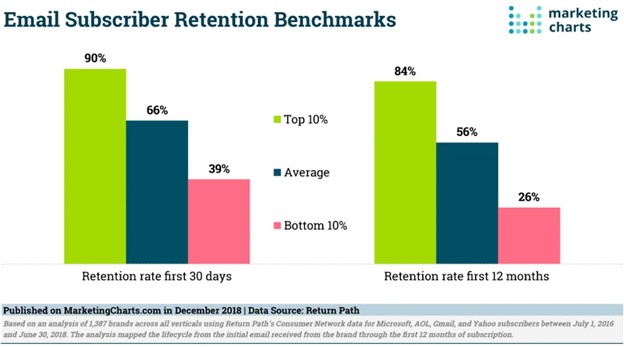
You might think that this isn’t such a big deal. According to a recent Return Path study, marketers lose 44% of their new subscribers within the first year of their subscription. And if a significant portion of that churn goes unnoticed because people don’t actually click the ‘unsubscribe button,’ we’re looking at a possible reason why your emails end up in spam.

Email Marketing

So, what should you do? To keep your list clean and hygienic, ensure that your entire list building process is flawless. That your data is properly collected and transferred to your email marketing software, and that you ideally use confirmed opt-in (a.k.a. double opt-in).

Consider this: the more effort you put into this process ahead of time, the fewer problems you’ll have in the future regarding bad data, human errors, and low inbox placement.

Pro tip 1: If you haven’t cleaned your list in a while, or if you haven’t processed bounces and unsubscribes, you should start now. The best way to accomplish this is to use an email verification tool and set up an automated re-engagement campaign that will send a couple of emails to those identified as inactive by the system.

You can easily do this entirely in elfoMAP. elfoMAP includes marketing automation templates that you can use to run such a campaign.

8. Your emails are image-heavy (but not text-heavy!)

Email marketing differs slightly from other marketing channels. Although images are important, they should not be the focus of your newsletters.

Many email marketers make this mistake: they overcrowd their email templates with images in order to make them look nicer and spend less time writing sales copy. This may seem like a good strategy–after all, people like images and can read the text even when it’s part of an image.

But there are two problems with this approach.

One is that, unless you provide the ALT text to your image, consumers that use screen readers may have trouble reading your content. Plus, with so many email clients blocking images automatically messages that don’t have the ALT text provided look rather unappealing.

The second is that ISPs such as Gmail and Outlook view this differently. Many heavy images result in heavy emails, and ISPs want to process as many emails as possible. By making your newsletters image-heavy, you make the process more difficult and resource-intensive. As a result, they may choose to filter your messages less favorably, sending them to the spam folder or even bouncing them.

In general, the more text there is or the higher its ratio to images, the better.

So, what should you do when images are required in your email template?

First and foremost, determine whether your email service automatically reduces the size of images you upload to your newsletter.

When you add your own images to an email template in elfoMAP, for example, you must first load the image editor and save the images to have them cropped and compressed. This is not the case for GIFs, which must be edited outside of the platform using tools such as Ezgif.

Pro tip: Adding more copy to your footer is one way to boost your text-to-image ratio. You could explain why your subscribers are receiving the email, who is sending it, and how they can manage their mailing preferences or unsubscribe from it there.

You can also boost your text-to-image ratio by including copy (in text, not over an image) in your email introduction and product descriptions. The same is true for creating call to action (CTA) buttons, which can be coded and styled to look almost identical to what your designer would create.

9. You are directing traffic to dubious websites (among other things)

Many email marketers are unaware that when ISPs and spam filters analyze your email’s content, they also look at your links.

Here are a few things to avoid if you’re trying to improve your email deliverability because it’s being flagged as spam:

  • linking to websites with a poor domain reputation
  • use links that repeatedly redirect users
  • use dubious link shorteners
  • with a low text-to-link ratio
  • linking to an excessive number of different domains

Keep in mind that your links may be hidden in the images you use. If they’re hosted on a website with a bad domain reputation, email spam filters may pick them up. Overall, you should double-check the websites you’re linking to and the number of links in your email. Again, a higher text-to-link ratio is preferable.

Pro tip 1: Before hitting the send button, run your emails through a spam checker. This way, you’ll be able to pinpoint the problematic section or individual element. It could be a single link or a section of your copy, so pay attention to all elements in your email template.

Pro tip 2: If you want to lower your spam score even further, you can include the plain text version of your message in your email template. Why bother including it?

Because it is one of the factors used by ISPs to determine the legitimacy of your email campaigns. It is also useful for those who prefer to read emails in their non-HTML format.

10. You’re playing dirty

Some marketers will do anything to increase their email open rates and get a chance of receiving a click on their link. What they often don’t realize, however, is their tactics leave their customers at loss. And even if there’s any short-term gain for their business, it often has a long-term impact on their whole email marketing program.

What sort of tactics are we talking about? For example, adding phrases like “Re:” or “Fwd:” to their subject lines. Adding these elements is meant to trick the subscribers into thinking that your marketing email is just a regular massage they’d receive from a friend or colleague.

Naturally, newsletters and other marketing communication don’t work this way. Although they do include personalization or a friendly from name, they’re not meant to trick people into thinking that they’re sent from an individual person in response to their previous email.

How about using the so-called spam trigger words? You know, words like “buy now” or “free”. Believe it or not, most lists of “words to avoid” are now obsolete. Spam filters have evolved so much, they don’t just look at the direct use of common phrases like the ones above. Using phrases like “cheap” won’t move your emails into the spam folder.

Pro tip: Now that spam filters have become more complex, your main focus should be on increasing your email subscribers’ engagement. One of the best ways to do this is to use email automation. Automated emails are sent in response to your recipients’ actions and preferences, which is why they generate above-average open and click-through rates. There are of course other ways to increase your engagement, but we’ll go over that in a moment.

11. Your email engagement rates are low

If you’re seeing that your average email marketing metrics are below the email industry benchmarks, there are a few things you should do.

First of all, focus on improving your email list hygiene. As we’ve discussed in point #7, it’s critical to keep your list clean from bad or inactive email addresses. That’s why you should regularly run re-engagement campaigns that’ll reactivate and separate inactive recipients from your most loyal readers.

The second thing you should consider is lead nurturing. Instead of throwing your new subscribers into the same stream of communication everyone else receives, you should treat them in a more special way. By designing a drip campaign, you can turn your new contacts from complete strangers to active consumers one message at a time.

Welcome emails will play a significant role in your lead nurturing campaigns. They are excellent not only for making a good first impression, but also for engagement and deliverability. It’s also easy to set up welcome emails. All you have to do is set up an autoresponder or a marketing automation workflow that will be sent immediately after a new contact is added to your list.

Last but not least, make sure to segment your audience for all major campaigns. Rather than blasting emails to everyone on your list, target the customer segments most likely to be interested in your offer.

You could base this on the customer attributes they provided when signing up for your list, or you could look at their previous behavior and identify only those who are engaged in your communication. By going for the more targeted approach, you’re likely going to see higher engagement rates and won’t need to worry about missing the inbox any longer.

Pro tip: Increasing your email engagement rates takes time. If your messages mostly land in the spam folders, start sending your email campaigns to only your most engaged audience. Once you’ve managed to reach them, slowly begin to go for the slightly less engaged ones and ideally skip those who are completely unengaged.

As mentioned before, in elfoMAP we evaluate your subscribers’ activity and assign them different engagement scores automatically.

12. Your mailing IP has a bad history record

If you’ve gone through all of the aforementioned reasons, fixed them, and your emails are still ending up in the spam folder, your mailing IP is most likely to blame.

The IP address through which you send your email campaigns develops its own reputation. And this reputation sticks with that IP address for months, even if no one is using it to send email campaigns.

Most email marketing providers (including elfoMAP) use a number of shared IPs to process your campaigns, so this isn’t usually a problem. In other words, a number of marketers work together to build a brand’s reputation. Furthermore, email traffic is routed through various channels to ensure that deliverability is maintained.

Having said that, if you’re having deliverability issues and are using your own mailing IP, you should look into this further.

Note: It’s also possible that your IPs’ reputation gets affected by someone else who’s sending their campaigns from an address within the same IP class. This is rarely the case, but if all else fails, you should look into the reputation of addresses in your IP class.

Pro tip: If you’re thinking about using a dedicated IP address to send out your campaigns, find an email service provider that offers full support.

Get out of the spam folder right now.

It’s time to start improving your email deliverability now that you’ve learned the 12 reasons why your email campaigns may be going to spam rather than the inbox and how to be seen as one of the great email senders.

If you’re ready to migrate your campaigns to an email marketing tool , sign up for elfoMAP!


TRY elfoMAP FOR FREE!

Using email marketing to onboard new customers is a simple process. It simply needs a little more effort and thought than standard email marketing. It’s simple to develop and even A/B test your campaign once you’ve decided on the topics and method you’ll use. If you’ve read this far, it’s likely because you haven’t yet created an onboarding campaign or are unsure if you are.

In any case, this article will hopefully clarify your doubts and persuade you to move beyond using a simple autoresponder for your welcome email campaigns.

Automated Email Marketing

Why onboard new customers?

First and foremost. So, let’s get to the bottom of the Why? Whether you employ a series of welcome emails or in-app marketing communication, onboarding campaigns are beneficial for a variety of reasons.

Here are a few examples:

  • They can help you describe the benefits of using your product or service, as well as the issues that it can solve.
  • You’ll be able to answer inquiries and alleviate any concerns your consumers may have.
  • You can persuade them to use your platform or service and hook them right away.
  • They’re fantastic at building rapport and defining the tone of a conversation.
  • They can help you set expectations for the next communication and the frequency with which it will be delivered.

Onboarding campaigns are also an excellent approach to learn more about your members. Discovering their preferences and aims from the start can help you develop a long-term relationship and maintain a high CLV.

How to welcome your subscribers the right way

These are the some of the most popular marketing tactics in welcome messages. They frequently begin the conversation with one of the following:

  • Welcome and thanks for signing up.
  • Here’s your free gift.
  • Here’s our best content.
  • What do you want to know?
  • Whitelisting instructions.

These are some ideas you could consider when developing your own email program. One thing that should be mentioned here is that your welcome messages should also include a way for people to contact you. You could do this by adding your phone number, a link to the “Contact us” page, direct email address to the account manager or a sales representative, functioning reply-to address, or links to social media. Anything else that you believe is important should also be included. For instance, the fact that you offer free next-day delivery or that you have a satisfaction guarantee program. Another approach worth considering is to begin by telling your brand’s story. If your company was founded years ago, and craftsmanship and attention to detail runs in your blood, then nothing should stop you from appealing to emotions in your message.

Did you know? elfoMAP email list management tools, which include signup forms, landing pages, webinars, funnels, live chats, and many other useful features, make it easier to grow and manage your email list.

Now let’s take a look at a few examples how popular brands welcome their new subscribers.

1. Alison

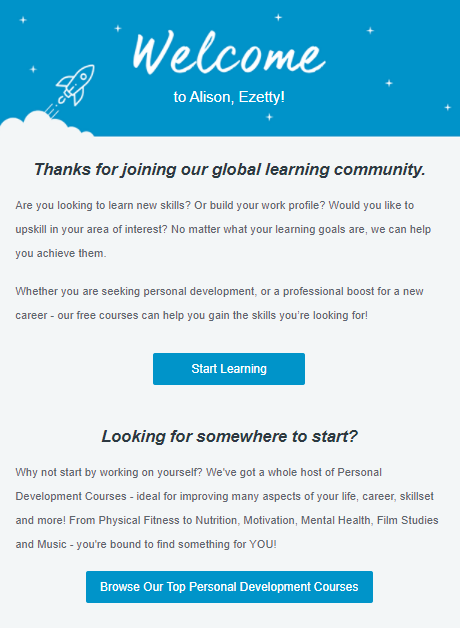
Here’s a message sent by Alison to people who have just sign up for their courses.

Email Marketing

The email is brief and sweet. It features a simple headline that outlines what just happened and then jumps right to the reasons why you want to use their service. They also give a brief of why you should join their free online courses. There’s also a single call-to-action (CTA) button that allows you to immediately log in and start join in their courses. The design is eye-catching, and the copy is clear and simple. They also listed out the top courses they offer in their site.

So, what does this email do? It sets the tone of the conversation, aims to entice you to sign up for the service and become addicted to it and also establishes a relationship, overcomes concerns, and prepares you for future communication.

Good effort for such a short and simple message.

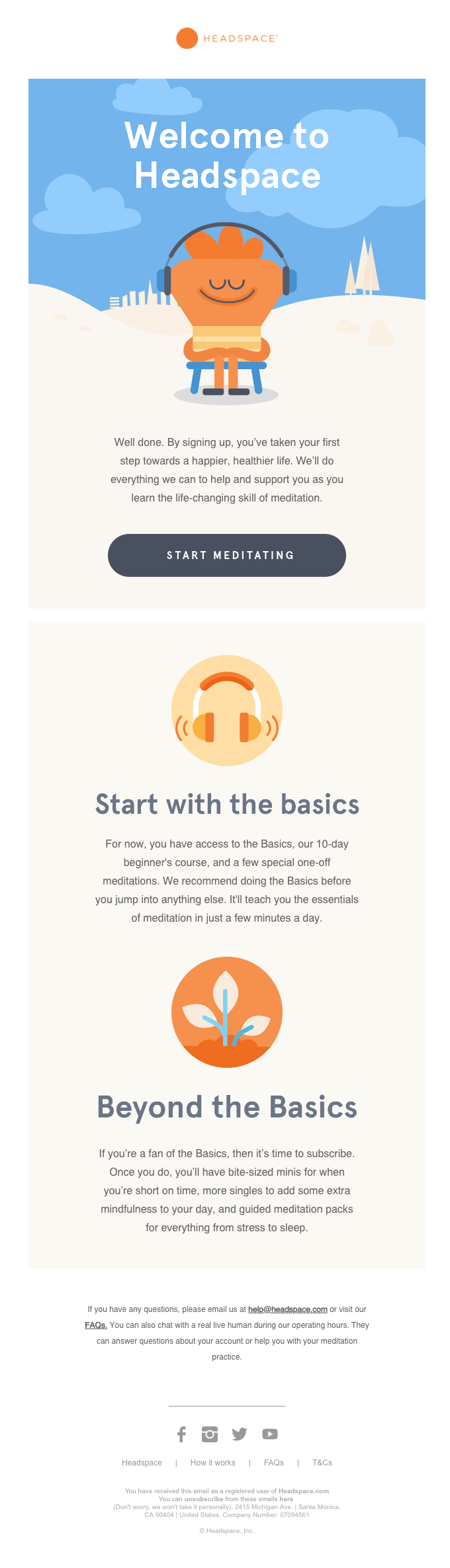
2. HEADSPACE

Email Marketing Services

This one is fun and playful newsletter by Headspace. The welcome email from Headspace starts with their mission statement. It explains how their service may help and support you in a healthier lifestyle with meditation.

What differentiates this email from others? First and foremost, there is the mission statement. They’re not just selling their service to you but give you benefits on how to manage you daily routine to the fullest.

Then those are the most appropriate areas to begin. This strategy allows the firm to highlight their top products while also supporting you in beginning on a trip that will undoubtedly be pleasurable. They also insert a CTA button for consumers to use their products and services. Other than that, they also give a 10-day beginner’s course to those who signed up.

The membership plan itself is amazing, as is the way it stands out. The supporting material allays users’ fears while emphasizing the advantages they will get. When you add in the satisfaction guarantee, it’s safe to assume that new members will subscribe to their services.

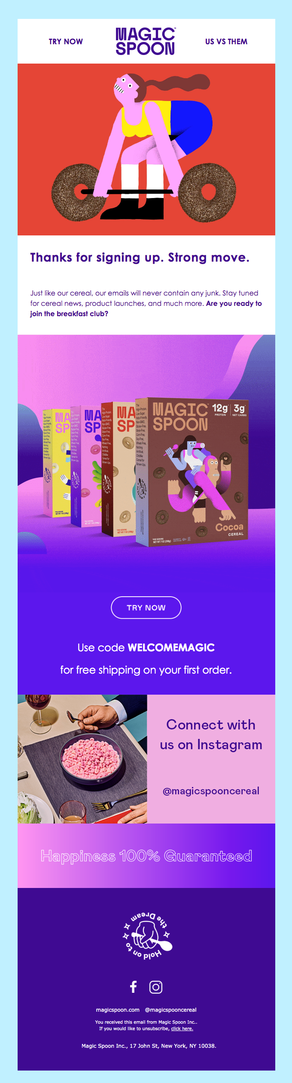
2. MAGIC SPOON

Email Marketing Providers

Just like the emails mentioned before, this welcome email message from Magic Spoon has a few strong elements.

The most important aspect is the headline, the subheader and the graphics. Once again, there is only one CTA button, which, in combination with the header and background graphics, underlines that this is more than a welcome email. It’s the beginning of a beautiful journey. They also give a discount code for new customer and this is one of the best initiative to make your customer eager to try your products.

Finally, the beauty of this email is that it’s brief and entertaining. Its design and language make you, the reader, feel as if you’ve just started your career as a local tour guide and are about to embark on an exciting journey.

Different levels of welcome emails

You’ve probably seen what other brands include in their welcome emails and jotted down some ideas for your own campaigns. Before you go, it’s important to understand that there are various levels of onboarding campaigns. These campaigns often vary by the level of sophistication and complexity. You could divide them into 4 distinctive levels.

I. Single welcome email

Every new subscriber receives a personalized message. This is by far the most typical strategy you’ll encounter. It’s an excellent place to start, especially if you want to analyze the campaign’s performance and use the data to segment your lists or send out subsequent emails. Even if it’s only to follow up with a survey or an offer to follow you on social media, you should normally send repeated messages.

II. Welcome email series

A sequence of pre-programmed messages, each of which focuses on a specific topic (e.g., a product feature or the best-rated products) and includes a single CTA that encourages you to visit the website. This is a nice strategy because it is easy to implement and A/B test. You can also benefit from knowing who has opened or clicked on your emails. However, if you want to create segments or plan future communication, you’ll have to do so manually in most cases.

III. Welcome email series with tagging and scoring

In a slightly more advanced technique to executing a welcome email campaign, tagging and scoring are used. You can use them to track your subscribers’ participation automatically or learn more about them. You’ll need to devise a lead scoring system ahead of time, as well as write down and share your tagging strategy with your team. However, once that’s done, you’ll be able to funnel your subscribers into multiple funnels and focus on other aspects of your business.

IV. Welcome email series with tagging, scoring, and behavior-triggered messages

The last level introduces a new variable to the equation: behavior-triggered messages. The goal is to provide each subscriber with a completely unique experience. You should be able to not only tag and score your subscribers based on their actions, such as clicks and opens, but also send them communications that represent their preferences. The drawback of this approach is that it requires more work upfront, e.g., to prepare the individual messages, automation workflows, lead scoring system, etc. The good news, however, is that you can expect high results from such campaigns. Timely and personalized emails are known to drive the highest user engagement. And marketing automation as a whole is an area which marketers will be focusing more on in the nearest future.

Don’t be afraid to experiment

Onboarding email campaigns are just as effective as they are important. Given the response rate they generate, they should become an essential part of any marketing campaign that you’re launching. At the same time, the welcome emails are simple to get started with. All you need is a couple of paragraphs of copy that show your gratitude and welcome the new subscribers to your list.

Add a link to your site, your best content, or top-reviewed products, and then follow up with a survey. You’ll quickly notice that you’ve just run your first onboarding program. Then have a quick look at the engagement you’ve generated. You’ll see that it’s worth the effort. Don’t be afraid to experiment! Every time you launch a new list or landing page, try out something new. Change the images, alter the copy, or the time of the send out.

If you’re looking for an email builder that create creative email templates that is fun and give rewarding experience, be sure to sign up for a elfoMAP free trial.


Start a free 30-day trial of elfoMap

Email list building is the foundation of effective email marketing. This continuous process of reaching out to your target audience and sparking their interest in your product or service feeds your revenue stream.

The goal of this article is to show you specific steps to take in order to build a strong email list and maximize your email marketing in 2021.

1. Make your newsletter a valuable product

If you want people to sign up for your newsletter, you must make it worthwhile for them to put in the effort and time. That is why I would advise you to treat your newsletter as if it were a product. I’d say develop a great product and communicate the benefits of using it.

When it comes to newsletter design, there are a few rules to follow, but in my opinion, they can be boiled down to the 3 followings: 

1. Focus on your target audience  

Focus on the people who are likely to become your customers. Constantly learn about their information needs and develop the right content that corresponds to their daily challenges.

2. Make it useful

Help solve real-life problems with your content. Put your resources into content that is valuable for your target audience.

3. Engage with your contacts and ask for feedback

Use your newsletter as a two-way communication channel to improve your email marketing, for example, by sending emails that people can respond to, asking questions, running surveys, organizing webinars, and so on. Remember that the closer you are to your customers and potential customers the more you know about their information needs.

Email Marketing Tools

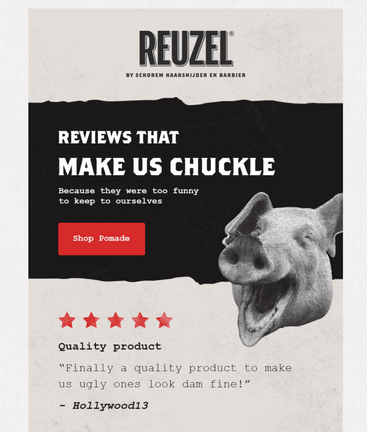
A fragment of email form REUZEL presenting selected customer reviews

Did you know? elfoMAP email list management tools, which include signup forms, landing pages, webinars, funnels, live chats, and many other useful features, make it easier to grow and manage your email list.

2. Promote your newsletter like a product

Once your newsletter is ready, you can advertise it and run promotional campaigns through the various channels available (just like you would do with a product).

  • Social media pages: Include a link to your newsletter signup form or a banner promoting your lead magnet in your email signature and on all of your important social media profiles. Most platforms allow you to personalize the description of your business page or the bio in your personal profile.

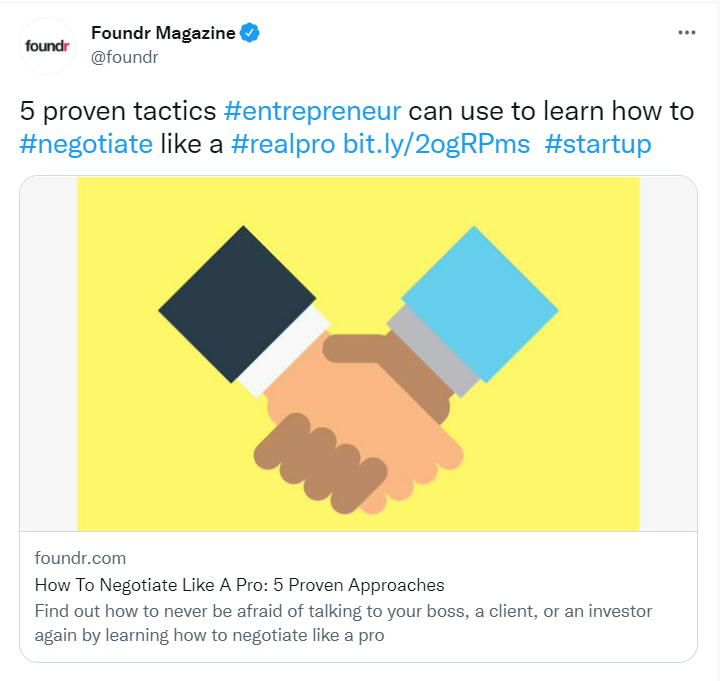
Here’s how Foundr Magazine promote their articles on Twitter.

Email Marketing Best Practices

  • Blog: it’s very likely that people who land on your blog organically represent your target audience. Invite them to join your email list if they like the content on your blog.

Email Automation Software

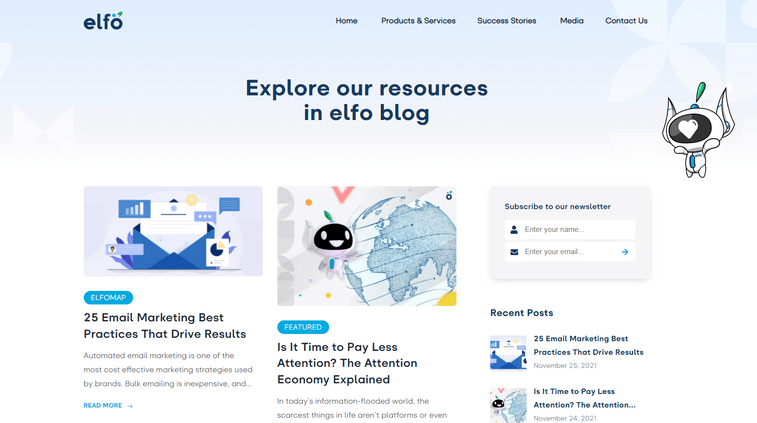
A signup form at the right side of elfo blog landing page

  • Podcast: if you run a podcast, tell people about your newsletter and provide a subscription link. You can even create a separate email list for your podcast listeners and provide them a VIP experience.
  • Partnerships: finding the partner is not easy but crucial for our well-being. Think of the people to run cross-registration campaigns and write guest articles with. Create a list of potential partners and put outreach on your weekly agenda.

Email Marketing Providers

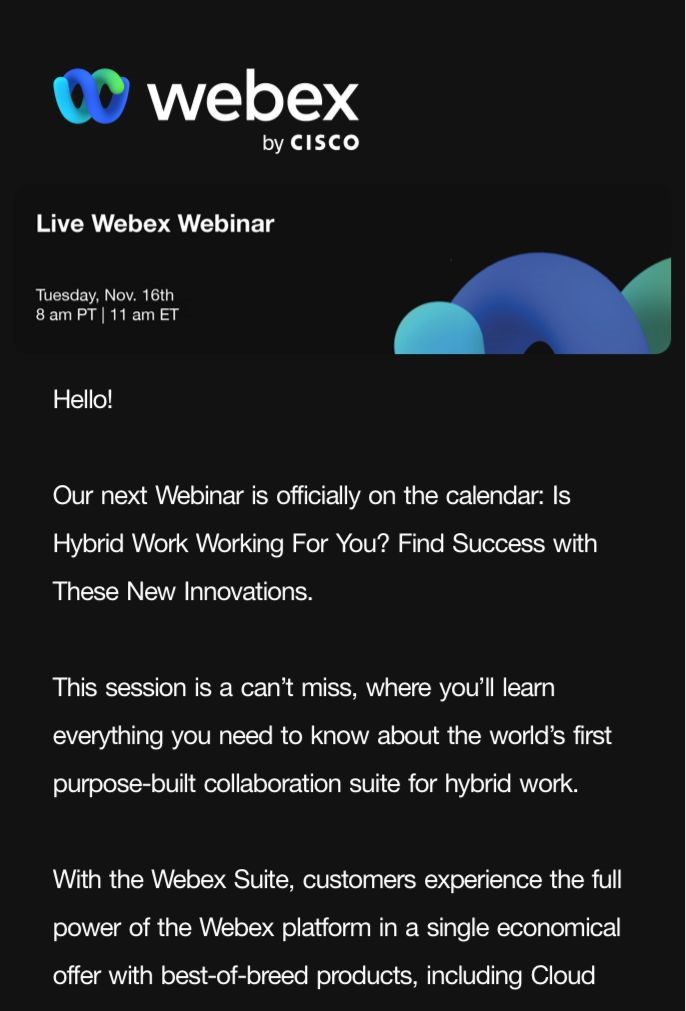
An example of a co-organized webinar from webex

  • Ecommerce customer profile: Make it easy for people to sign up for your newsletter when they sign up for your ecommerce platform.

Best Email Marketing Platform

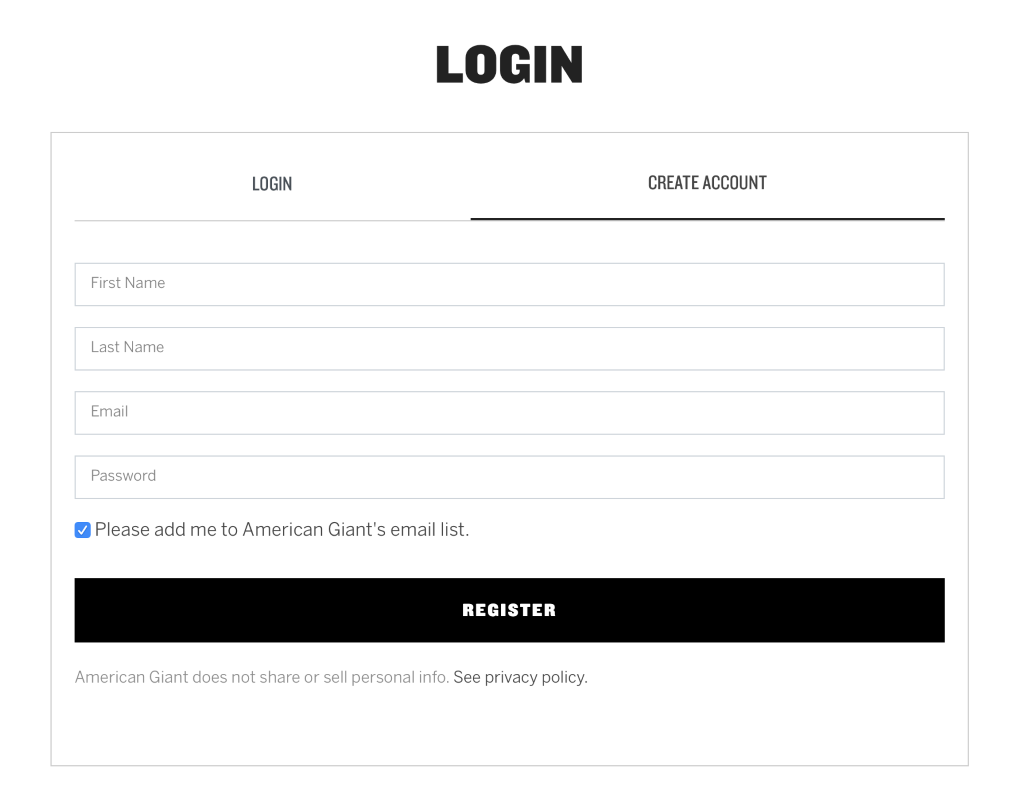
A checkbox allowing visitors to add their email address to an email list at registration from American Giant

  • PPC campaigns: Paid advertising requires a budget but also provides a lot of targeting options, allowing you to reach your target audience with unparalleled precision. Investigate opportunities such as Facebook Lead Ads and retargeting campaigns to increase the size of your contact list.
  • Tools and software: Creating an online tool or software that your target audience will want to use is a great way to grow your email list. Rather than requiring users to pay up front, offer them limited access in exchange for their email address.

3. Create lead magnets

A lead magnet is something valuable for your target audience that you offer in exchange for contact information. The lead magnet’s purpose is to incentivize subscription and increase the number of targeted leads captured via a web form.

Lead magnet examples: 

  • E-book
  • Guide
  • Report
  • Checklist
  • Resource kit
  • Framework
  • Educational materials

Email Marketing Solutions

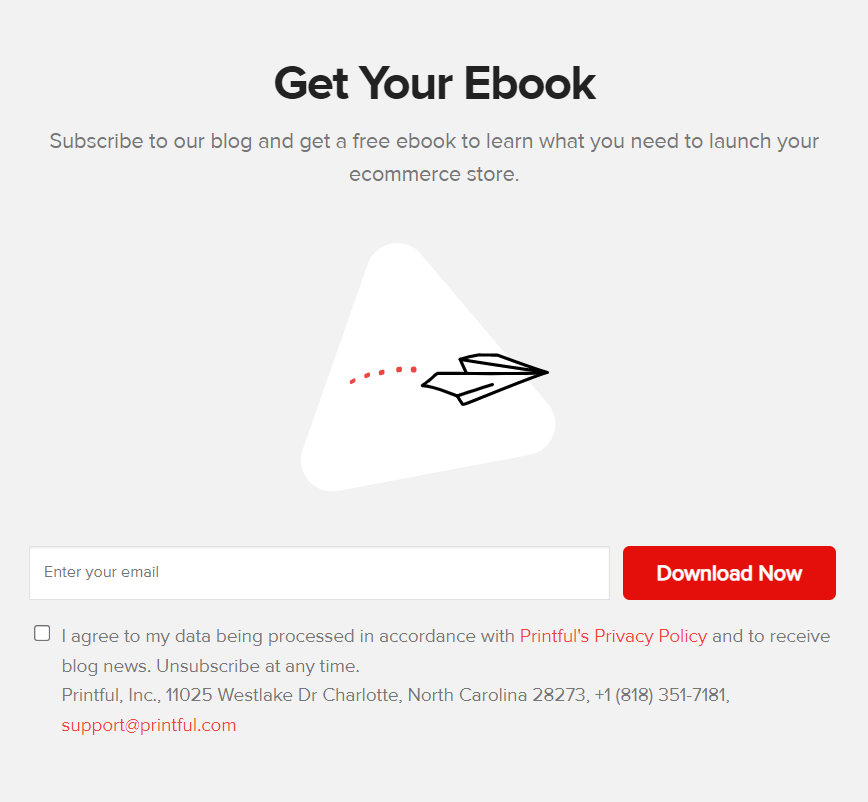
Example of a free ebook created from Printful.

There are of course other types of “freebies” or “opt-in bribes” you can offer.

The key point here is that if you want to grow your email list, you must create content that your target audience will be willing to exchange their email addresses for.

4. Present the benefits or joining your email list

Why should anyone sign up for your contact list? I’m sure you can quickly answer this question at this point, but do you communicate clearly to people who haven’t heard of your brand yet?

Go beyond the “sign up to our newsletter” by simply providing a few reasons to do so.

Email Marketing Services

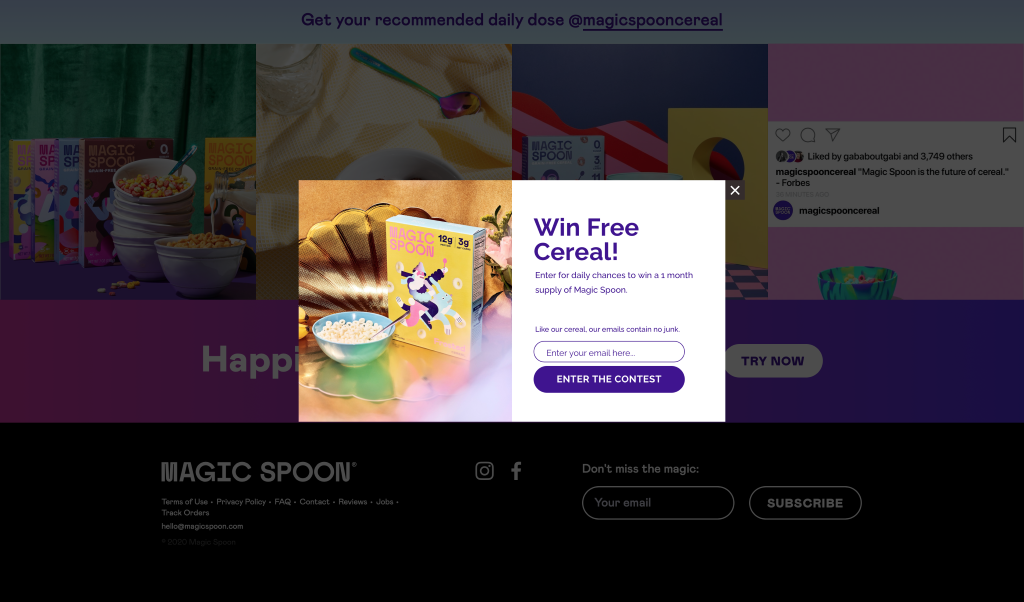
A pop-up inviting website visitors to enter a contest from magic spoon

Come up with different incentives, like a loyalty program, discount, exclusive merch, or contest and test which one proves to be most effective.

5. Create a landing page for your newsletter

A landing page, also known as a “lead capture page” or a “squeeze page,” is a single web page designed to build contact list. Create a landing page for your newsletter.

Email Marketing Automation Platforms

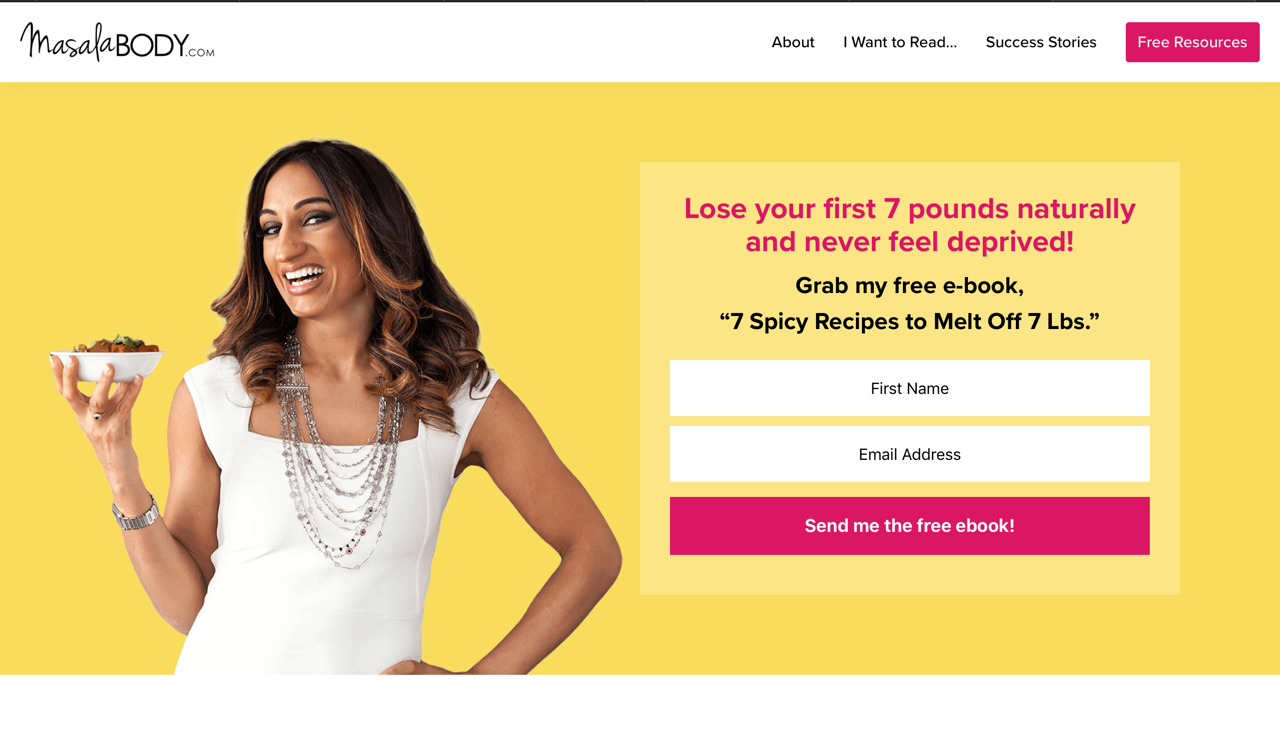
Example of a short squeeze page containing only two fields – name and email address – and offering a free ebook from Masala Body

There are many ways you can build landing pages but the most convenient one is to use a landing page creator.

Landing page creator available in elfoMAP comes with mobile-optimized free landing page templates, intuitive drag and drop editor, and multiple other features.

Conversion tips: keep your landing page simple by providing a single call to action. Create A/B variants of your landing page. Run tests and see how content type, copy, or design changes influence performance.

6. Add subscription forms to your website and blog

A web form, also known as a signup form, is an HTML form that is placed on a website to allow visitors to sign up. There are various forms to choose from, such as a subscription form, download box, scroll form, fixed bar, lightbox, or an exit pop-up.

Add a fixed bar or a pop-up form to the pages with the highest conversion rates, such as the product page and the about us page. People who are interested in your offer will be able to sign up and receive more relevant information. You can create a web form from scratch or use an email list builder, like the one built into elfoMAP.

There, you’ll find various templates to choose from as well as an easy-to-use editor that will allow you to customize your web form to match the style of your website.

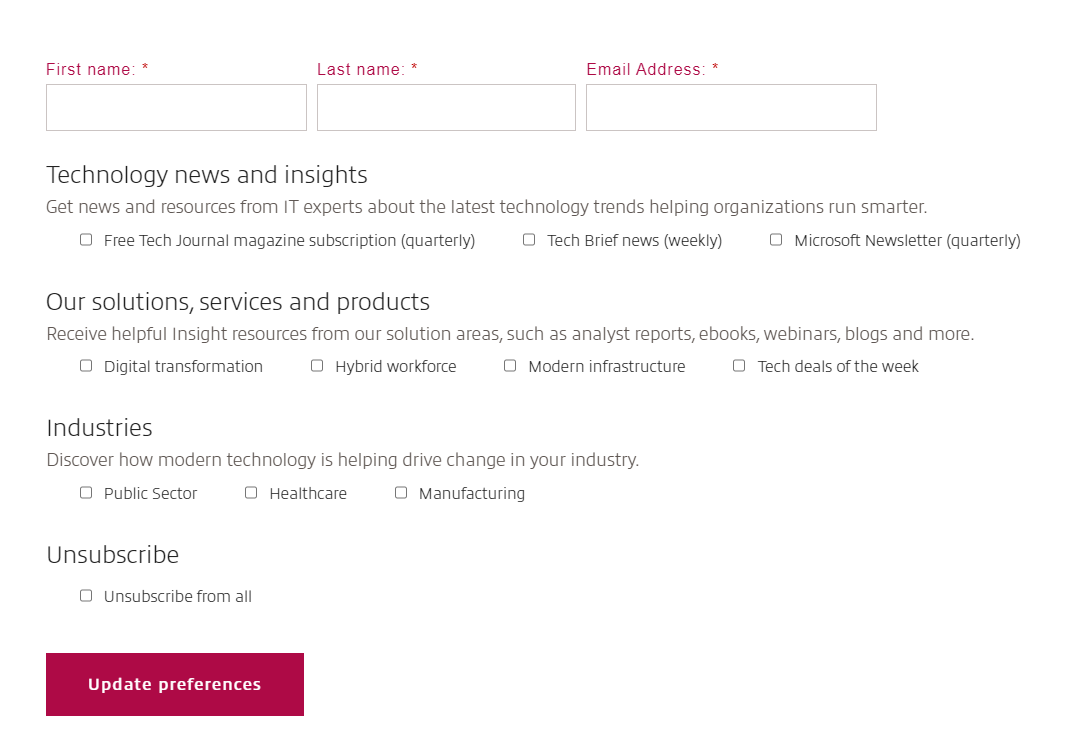
Consider the quality-to-quantity ratio when designing your web form. If you want to reach a specific target audience (for example, to generate B2B leads), you may need to create a longer web form that requests more information: company name, company size, position, etc.

Email Marketing Agency

Example of a long webform designed to collect email subscribers from Insight

If your goal is to reach a larger audience (for example, potential ecommerce customers), you may ask only for basic information such as name and email address.

The general rule is that the longer the form, the fewer people subscribe. The shorter the web form, the more subscriptions you get, but you have no idea how many people meet your criteria. The trick is to know what you want and to ask only for information that will help you achieve it. This will help you balance the quality/quantity ratio.

7. Create a survey for website and blog visitors

Visitors to your website and blog have already expressed an interest in your products or content. Use surveys to get people to subscribe to your content if they like it.

8. Run a webinar for your target audience

A webinar, also known as an “online seminar,” “web conference,” or “online meeting,” can be an excellent way to build an email list of high-quality contacts. The concept is simple: you provide valuable information to anyone who signs up for your contact list.

Carefully planned webinar content will certainly attract your target audience. To maximize reach, promote your webinar through other online marketing channels.

Pro tip: Partner up with people in your industry with same target audience.

9. Create a list building funnel

Looking for a more efficient way to generate leads?  There are 2 kinds of a list building funnels:  


1. Lead magnet funnel

Lead magnet funnels allow you to host your lead magnets, create landing pages, autoresponders, and promote them with Facebook Ads all in a matter of minutes.

Pro Tip: To begin collecting email subscribers with lead magnet funnels, you do not need a lead magnet. They include a collection of pre-made templates and content upgrades that you can use in your own campaigns.

2. Standard opt-in funnel

Even if you don’t have a downloadable opt-in incentive, these list building funnels can help you set up a full lead generation campaign. They can be used to promote your newsletter, an email course, a monetary incentive, or a resource vault.


Start a free 30-day trial of elfoMAP. No credit card required.

Automated email marketing is one of the most cost effective marketing strategies used by brands. Bulk emailing is inexpensive, and even if only a small percentage of recipients respond, it is still cost-effective. Email marketing, on the other hand, can produce significantly better results when done correctly.  

Read on and follow these 25 email marketing best practices that’ll keep your customers engaged, improve your ROI, and get your campaigns going in 2021 and beyond. 

1. Send Welcome Emails 

Welcome emails help in the maintenance of your list and the delivery of your emails. If someone enters the wrong email address, the welcome email will generate a hard bounce. This then alerts your email provider to remove the email from your list. 

They also reassure your new email recipients that their sign-up was successful and that the information they are looking for is on its way. They also assist you in connecting with new subscribers. Offer something valuable or exclusive at the start of their journey to increase click-throughs. 

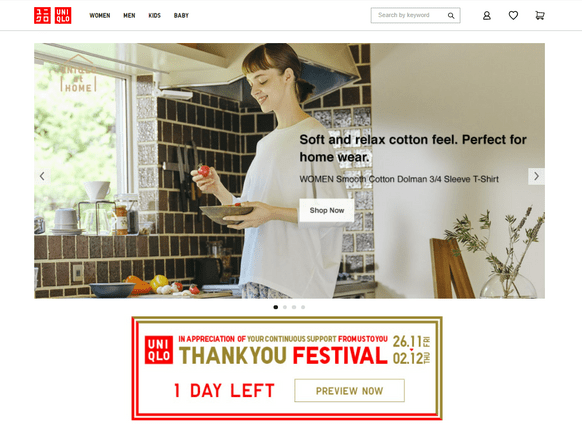
Source: Uniqlo

2. Time your email marketing campaigns well 

Every email marketing provider wants their newsletter to be at the top of the inbox. After all, most subscribers will select the first emails they see. 

When should you send your emails, then? 

The best time to send an email is largely a personal preference. It varies according to location, industry, and audience. 

The best email marketing practice is to use a send-time optimization algorithm. These tools adjust the send-time for each individual subscriber automatically, based on their previous behavior. 

However, if you are unable to use send-time optimization algorithms, you should consider the following results and send your emails early in the morning. 

3. Take it easy on the email frequency 

Reduce the chances of your emails showing up in your subscribers’ spam folders by following this marketing automation best practice. As a result, your email’s deliverability improves. Building anticipation for your next campaign will increase your audience’s appreciation for you. Make them eager to receive your next major email campaign.  

Consider this: A golden ticket is offered to you by an opt-in subscriber: they have entrusted you with their email address. So don’t spam their mailbox or utilize strategies like email blasts.

Setting your frequency is simple with elfoMap. This is because the email marketing platform allows scheduling and automatically resending your email campaign to subscribers who haven’t opened it. 

Remember that while it’s simple to control how frequently you email, it’s often more difficult to see how many triggered emails are sent to your contacts each week–particularly if they’re sent in response to an action. 

4. Use email deliverability best practices 

Email deliverability is important to the success of your campaign. It makes no difference how interesting or beautiful your emails are. Subscribers will not convert if they never see them. 

Verifying the email addresses you send to is one way to ensure that your email is read. This is easily accomplished by using an email checker to ensure that the email address exists and is valid. 

Many marketers believe that email deliverability is solely the responsibility of their email service provider. But it goes further than that. Email content, frequency, and list-building strategies all have an impact on deliverability. 

5. Use a memorable sender name 

First impressions are important. In email marketing, it may also be the last one sent. If your email does not stand out and develop trust, your subscribers are unlikely to open it. 

So, how do you go about doing that? 

First and foremost, your sender name should be memorable and recognizable. 

You also have to offer value. Always. This article has plenty of tips for that, so let’s focus on making your sender name identifiable. 

Most brands use one of the following formats: 

– [Brand Name] 

– [Employee Name] from [Brand Name] 

– [Employee Name] @ [Brand Name] 

– [Brand Name] Customer Support 

– [Brand Name] Newsletter 

– [Brand Name] Digest 

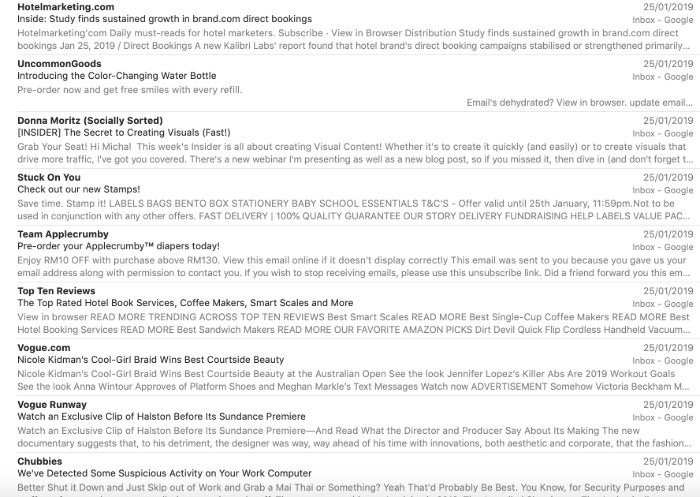
Here are some real examples from my inbox: 

Email Marketing Best Practices

From name address examples from various brands 

As far as we’re aware, no-one has ever studied which one works best. 

It seems to be a matter of preference–and what suits your brand voice guidelines. 

If you have a strong employee with a good personal brand who’s associated with a particular campaign, you could use the combination of [Employee Name] from [Brand Name]. 

Example: Abby from elfoMAP 
Topic: New upcoming webinar 

But that might not work for B2B emails when it’s more important for the communication to come from the brand itself. 

Example: McKinsey 
Topic: Mobile Ecommerce Trends in EMEA 

So, take these ideas, compare them with your brand voice guidelines, and A/B test them. Then stick to the one that works. 

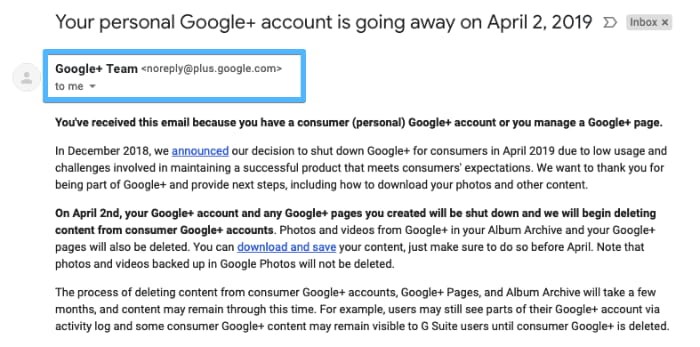
6. Ditch the noreply@ address 

The noreply@ addresses is a little ironic.  

Most marketers will swear that their customers are at the heart of their operations. That they value their customers’ feedback, both positive and negative. Then, after earning their trust and persuading them to fill out an opt-in form, they use an email address that plainly states: 

“We don’t care about you enough to check your inbox.” 

I understand. The volume of auto-reply and out-of-office messages can be overwhelming at times. And sometimes your email does not appear to be one that will elicit a response.  

Your customers, on the other hand, may have a different perspective. 

Don’t make it difficult for them to provide feedback. Who knows, maybe those who take the time to respond will become your best brand ambassadors. 

The advantages of dropping the noreply@ address outweigh the disadvantages. 

Email Marketing Solutions

No-reply email address from Google+ announcing the closing of their platform 

7. Test your email subject lines 

Setting aside those who open every email, your recipients will generally only see three things before they decide to open or ignore your message: 

  • Sender name 
  • Subject line 
  • Preheader 

So how do you write effective email titles

Take time to craft your email titles. 

Treat them as the most important element of your email marketing campaign – which they are. Don’t leave it as an afterthought. Set aside time to A/B test your subject lines. And use data, not your gut feeling. 

Be creative. And try personalization and emojis. Both have shown to have a positive effect on average email open rates. 

8. Use confirmed opt-in 

Whenever we talk about good email practices, we always say email list quality beats quantity. 

But we meet many marketers who are scared to use confirmed opt-in. 

Here’s how it usually goes: 

Q: But won’t it make my list smaller? 

A: Probably. 
 
Q: Won’t people be angry having to click the link to get my emails? 

A: Some might. 
 
Q: So why on Earth would you suggest using confirmed opt-in? 

A: Because the benefits outweigh the costs. At least that’s what our data suggests. 

When you compare the average email marketing results by industry with the use of double opt-in by industry data, you can see a link. Industries that use confirmed opt-in more often usually outperform those who don’t. 

This article outlines why it’s worth using double opt-in. Why not give it a go? 

At the very least, it will positively affect your deliverability–which is still a big win. 

Email Marketing Services

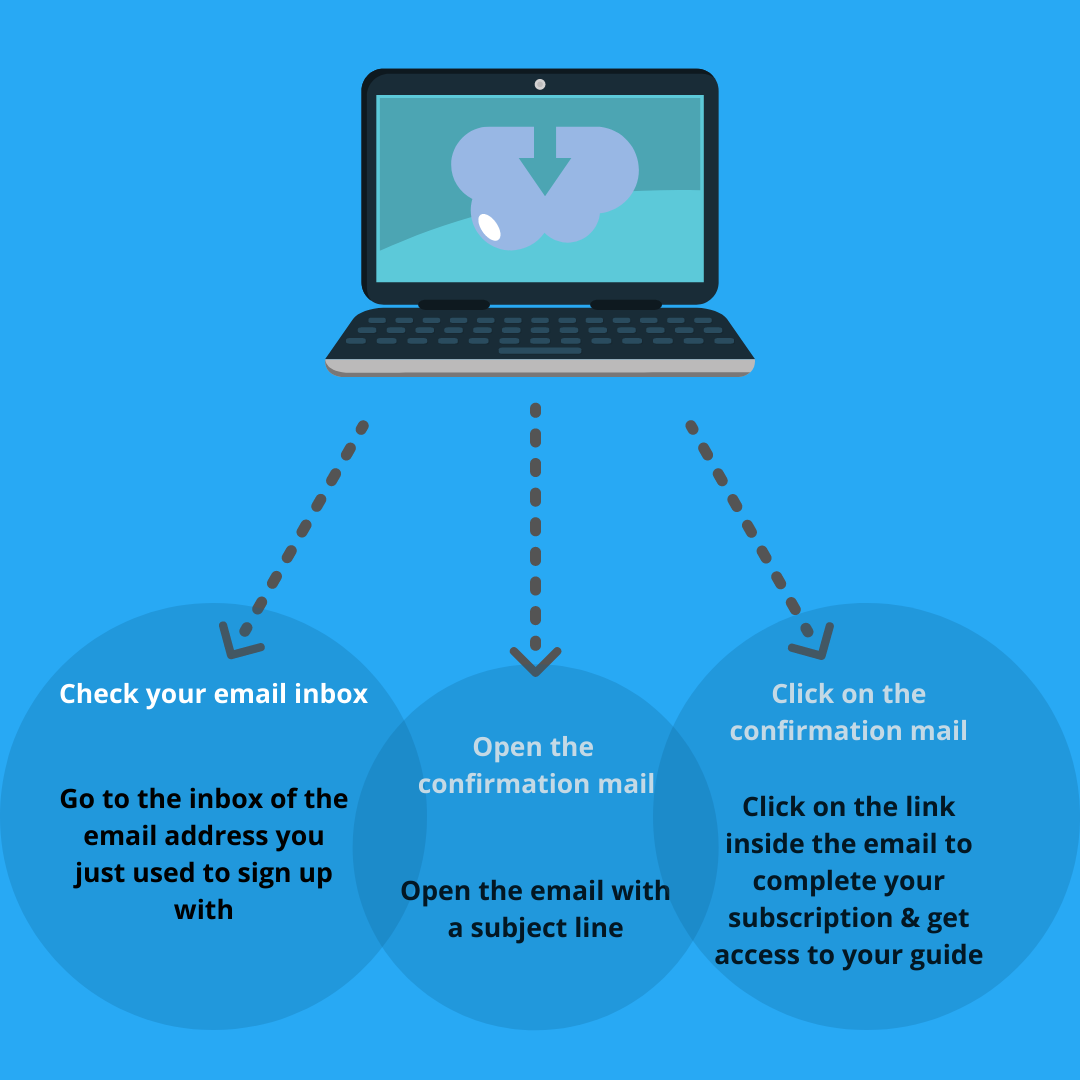
Clear instructions regarding the confirmation email presented on a thank-you page 

9. Make unsubscribing easy 

Here are a few pointers to help you make your unsubscribe process as simple as possible: 

  • Don’t make your subscribers log into your app to unsubscribe because they may have lost access to it. 
  • Explain to your subscribers why they are receiving your emails in the first place, for example, in the footer of your emails or on the unsubscribe page. 
  • Provide a one or two-click unsubscribe process via a hyperlink in the footer of your message. 
  • Use a common phrase as your hyperlink text, such as “Unsubscribe,” so that people can find it quickly in the message. 
  • Make the unsubscribe link large enough so that people using mobile devices can easily click on it. 
  • On the unsubscribe page, avoid using dark patterns or tricky copy. 

10. Use lead magnets 

Building an email marketing list is more difficult than it used to be due to increased competition. 

A lead magnet can be an excellent way to provide value right away. Lead magnets, also known as incentives, freebies, or ‘bribes,’ are the most effective way to overcome people’s skepticism. It could be a downloadable ebook, a special industry report, a calendar, or some other enticing freebie. 

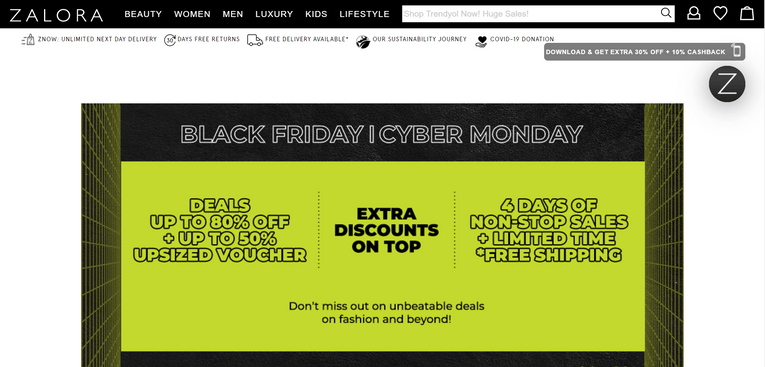
Here’s a lead magnet we like: 

Email Marketing Tools

Source: Zalora

If you have not signed up with Zalora and open their landing page through website, you will see a box where they used lead magnet for customer to download their app and receive discounts. This will make their potential customers to download their app and use the discount.

11. Drive click-throughs with engaging content 

What’s so special about emails you consider click-worthy? 

If you look at your favorite newsletters, you’ll probably find some common threads. They either offer great products, interesting stories, thought-provoking articles, funny videos, or something else. 

It’s a cliché, but you have to get creative. 

12. Test your emails before hitting send 

“Make no mistakes.” That would be a terrible email marketing tip! 

As an alternative, suppose you should test and preview your emails before sending them. We’ve all seen emails with incorrect personalization, broken subject lines, or images. 

Those who address you as Emma when your given name is Bob. 

Those who say you’d look great in a dress but prefer cargo shorts. 

Or those that are so shattered that you don’t know where to look. 

All of these blunders, however, are avoidable. 

Take the time to preview your emails in popular email clients, ensure they won’t end up in the spam folder, and send the message to yourself – before sending it to your entire list.  It’s simple and only takes a few minutes to complete.  

Inside the elfoMAP Email Creator, run an inbox preview email campaign test. Examine how your emails will appear in various web browsers and email clients. 

It’s a good idea to double-check your emails for typos. 

Of course, you could make a deliberate mistake as a stunt or joke. Just make it a good one–and don’t do it too frequently! 

13. Audit your communication regularly 

Automated email campaigns are frequently marketed as something that can be “set and forget.” That isn’t entirely correct. 

What you include in your email communication isn’t always going to be timeless. Your language, the things you’re referring to, or the images you’re using may become not only out of date, but also insulting or opportunistic. 

With so much going on in the world around us, we must be cautious about our messaging and how others will perceive it. 

So, make auditing your automated email communication a habit. Something you do once every quarter or two. This way, you can keep your messaging relevant, engaging, and, most importantly, considerate. Your audience will respect you for it and remain loyal to your brand as a result. 

14. Design emails for accessibility 

There are ways to make your emails easier for the public to access. 

First, add ALT text to your images. People using a screen reader can then understand the content better. 

Tip: Add a period after the image text. The screen reader will then pause, so it’s easier to understand your email. 

You can also check the image contrast ratio to improve readability. 

15. Focus on the right metrics 

The email open rate is often considered a vanity metric. The click-through rate is more actionable, but it still doesn’t tell you how much revenue your campaigns generate. 

So, it’s best to learn about all the key email marketing metrics and how to choose them to suit your objectives. 

16. Use a matching pre-header 

Do you remember we said the sender name, subject line, and the preheader are the first things subscribers see? 

Even if half your subscribers open your message on the subject line alone, the rest are swayed by other things. While they’ll likely see the sender name first, the pre-header still plays a part. 

This is especially the case for email campaigns with shorter subject lines, since the preheader will take up more space. The preheader can enhance your email subject line and increase your open rates. 

Take a look at these examples: 

Email subject line: Drop Everything. Sitewide Sale. Now. 

Preheader text: It’s our birthday 🎉 Sitewide Sale + Free Shipping & Returns to celebrate! 

Subject line: It’s now or never! 

Preheader: Only 8 hours left on these Cyber Monday deals 

See how the preheaders add more information to sway someone to open up? 

Here’s a creative subject line and preheader combo that caught our Chief Wordsmith’s eye: 

“and the winner in the “Best Valentine’s Day Subject Line/Preheader Combo” category is… @phrasee (why am I not surprised?) pic.twitter.com/YOdBnzmtbc

— Karolina Kurcwald (@karolstefan) February 14, 2019 

So, pay attention to your preheader. 

17. Inspire action 

Finally, in order for email marketing to be successful, your subscribers must take action. 

However, there are times when you need to give them a little push. When designing your emails, make sure the recipients understand what they should do next. 

Is it to sign up for a webinar? How about downloading an ebook? Or perhaps they could share your storey with their network? 

Whatever it is, ask for it! 

To do that, you’ll need calls to action (CTA). These can be either buttons or plain text. It is preferable if you test them. The fewer calls to action there are, the more attention they will receive. 

Their design and placement are also important. 

Keep them visible and easy to find–especially on smaller devices such as mobile phones. Play with the copy and elements surrounding your calls to action to make them more powerful. You could, for example, include a countdown timer or mention when the offer expires. Or, for added credibility, include a testimonial. 

Email Marketing Services

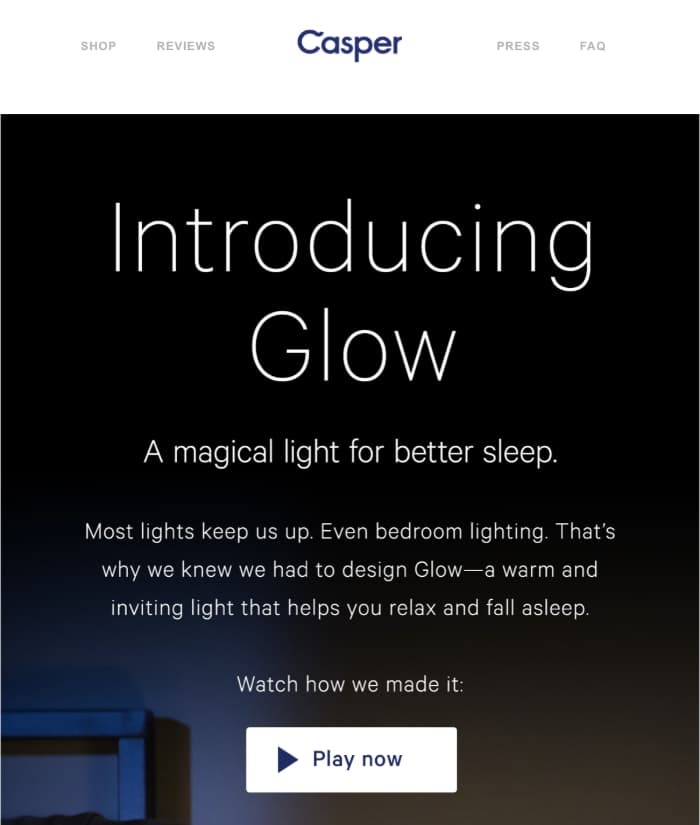
Creative call to action copy in a newsletter from Casper 

Email Marketing Agency

Descriptive call to action button copy from Uncommon Goods 

18. Use the thank-you page strategically 

What do you want your subscribers to do after they fill out your subscription form? 

Do you want them to get into the habit of opening your emails? Perhaps you could even be designated as the safe sender? Or do you want them to come to your blog instead? 

Your thank you page can assist you in accomplishing all of this. That is, if you use it wisely. 

Consider the following: 

The user has just indicated that they trust you and wish to receive content from you. It’d be unwise to waste that opportunity and offer them nothing in exchange. 

Thank you pages can assist you in increasing deliverability and open rates. They can also assist you in increasing traffic to your most important pages. Not to mention that they have the potential to increase your conversions. 

19. Make your emails skimmable 

We’re all very busy these days. 

We are also constantly distracted by various things, people, and marketing messages. That’s why we frequently take the simplest and quickest route to completing a task, whatever it may be. This approach also applies to email reading and inbox cleaning. 

As a result, if you want your emails to convert better, make sure to communicate your message as soon as possible. 

Structure your content so that it is simple to read and understand. To state your main message clearly and quickly, use bullet points, headlines, lists, and preheader text. If you do it correctly, you should see an increase in email engagement metrics, such as click-to-open rates. 

Here’s one brand that I know does it well. Take a look at their email address, which is listed below. 

Best Email Marketing Platform

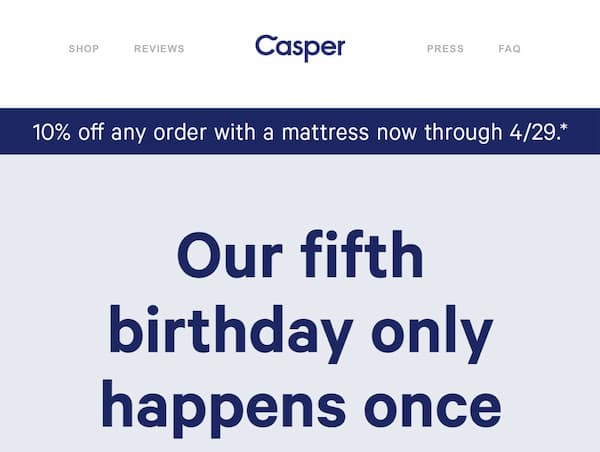
Casper newsletter

Effective use of the above the fold section in Casper’s newsletter. 

You don’t even need to scroll below the fold to get the gist of the deal. They’ve covered everything important in that single sentence, which is displayed prominently. 

This method is excellent for two reasons. It saves the subscriber’s time – they can skip ahead if they aren’t interested – and allows the brand to quickly capture the attention of those who are in the buying mood. 

Simple, yet effective tactic. An email best practice worth adopting. 

20. Use a professional email marketing tool 

Of course, we’d say that. 

After all, among many other features, elfoMAP offers email marketing software

But that’s not why I’ve included this best practice in this list. 

Marketers frequently begin their businesses by sending marketing messages from their own company domain using a tool like Outlook or Apple Mail. 

Your business grows, and so does your email list. At some point, you notice that people aren’t responding to your messages, even though they seemed interested in your offer just a moment ago. Their shift in behavior may not be due to an ineffective sales pitch, but rather to how you send your email campaigns. 

Email marketing tools like elfoMAP assist you not only in making your emails look nice (with free mobile-responsive templates and features like the Email Creator), but also in managing your reputation and effectively delivering your messages. 

21. Design a marketing funnel 

A single marketing channel cannot function on its own. 

You must have an audience if you want to sell your products or services online. To have an audience with whom to speak, you must first build an email list. To do so, you must first create a landing page and direct traffic to it. After that, you must provide them with a lead magnet and nurture them after they have successfully signed up. 

This process goes on and on, and it’s easy to become disoriented along the way. 

This is where marketing funnels come in. They’ll assist you in making better use of your marketing channels, staying on track with your business goals, and increasing conversion rates. 

The good news is that although marketing funnels may sound a bit intimidating at first, they’re pretty simple to set up. Even simpler if you use a tool that helps you create them automatically. 

22. Segment your audience 

Sending an email blast to your entire list may work occasionally. 

However, your chances of generating sales with email campaigns are best when you create personalized content for specific customer segments. 

You’ve probably heard of the Pareto principle. 

20% of your customers account for 80% of your sales revenue. 

Is it possible? Don’t just take my word for it. Just verify it. 

Identify the key segments, such as your most engaged subscribers or those with high RFM scores, determine how much revenue they generate, and target them separately with your email campaigns. 

If you can’t find these customers, stick to the segments that come to mind right away (the chances are you know your audience so well that you’ll recognize the best segments without doing any additional research). 

Email Marketing Providers

Welcome email from a brand named Desigual

Notice that the message is divided into several topic sections. By using this tactic, the brand can segment their audience using the click-through data 

23. Use targeted pop-ups 

Despite how you feel about them, popup forms are one of the most effective methods for building email lists. Plus, there’s a way to make them less annoying for those who aren’t looking to join another email list. 

The solution? Targeting

Ask yourself these questions when building your web forms:

  • When should the web form appear? 
  • When should it be hidden? 
  • Should it be shown to the same user again, and if so, how often? 

Since you don’t want to irritate your users, you’ll want to present your option forms only when it makes sense. 

Tip: To determine the best time to display your web forms, consider the average time users spend on that page as well as your bounce rate. We like to configure our forms so that they only appear when users have demonstrated an interest in the content they’re reading. 

24. Use your header to entice people to read on

Getting people to open your email is only the beginning. To entice them to click on your offer, you must first draw them in and entice them to scroll through your message. 

Making good use of the above-the-fold section, particularly your header, is a great way to accomplish this. 

Email Automation

It is undeniably noticeable. Because most of our emails do not resemble cartoons, it immediately catches our attention. 

There’s even more. The cat in the picture is trying to tell us something, but we won’t know what until we scroll down. 

So, what are we to do? If that’s our sense of humor, we’ll definitely scroll down and learn about their offer. 

Of course, this approach will not work for every brand, so let’s look at another example. 

Email Marketing Automation Tools

The circumstances are very similar. 

A big headline declares that this product has been reintroduced due to popular demand. It makes you wonder if whatever it is, if people are asking about it, it must be good, right? 

So, we scroll down and notice a bubble that says, “I heard it was the fastest-selling limited edition ever.” 

Again, you’re thinking: OK, it sold out really quickly. It must be very good now. 

So, what are you going to do? You continue to scroll and learn more about their offer. These are only two examples, but I believe you get the idea. The email header should entice recipients to open your email. It must capture their attention and persuade them to continue scrolling down. 

Pro tip: Keep in mind, most email headers contain a call-to-action link, and that’s what you should do, too. 

From our experience, most email recipients click on the first button they see in the email (especially in ecommerce) and continue their journey on your website. So, make sure always to add that hyperlink to your header image and drive people to your website. 

25. Make better use of the footer 

Most email marketers make inefficient use of their email footer. They only use it to provide all of the legally required information, such as an unsubscribe button or their company address, and that’s it. 

However, there is so much more you could do with your footer. It may also assist you in driving more conversions. 

Here’s an example from Magic Spoon that carries a promise of happiness. 

Email Marketing Automation Platforms

Source: Magic Spoon


Here are a few more ideas you could include in your footer: 

  • A quote from your customer acting as a social proof 
  • Logos of the sites that featured you 
  • Your unique selling proposition, like 100% money-back guarantee or world-wide free returns 
  • Option to review your message 
  • Results of your latest newsletter give-away 

Your next steps 

You now know all our recommended email marketing best practices. 

We’ll keep it updated with more actionable email marketing tips to help you improve your campaigns.

 TRY elfoMAP FOR FREE

It is important to properly measure and analyze your results over time in order to be successful with an email marketing campaign. Many marketers, however, are unaware that email marketing metrics extend beyond open rates, click-through rates (CTRs), and unsubscribe rates.

In fact, none of these will help you answer the most important question: Is your email marketing campaign effective?

So, in this guide, we’ll go through everything you need to know about email analytics to effectively gauge success and meet your goals.

Once you know the costs and have defined what conversions look like to you, you’ll learn about the key email marketing KPIs that help you measure success – the ones you see in your email marketing platform and the ones you can only calculate yourself.

Email marketing metrics to monitor

The following is a list of the most important email marketing metrics for you track and pay attention to when doing your email campaign analysis.

Note: Different email marketing service providers may calculate these metrics in their own unique way. The following formulas are what I’d call a “standard” way of measuring the performance of your email campaigns. To ensure that you’re comparing apples to apples, I’d recommend comparing the metrics with a single tool or email analytics dashboard.

Key email marketing metrics every marketer should track

1. Email open rate

What is it?

Your open rate is most likely the first metric you’ll look at, and it’s certainly one of the most important. This figure indicates how many people opened your email in comparison to the number of people you sent it to.

It’s shown as a percentage and is calculated by dividing emails opened by emails successfully sent (excluding those that bounced).

How to calculate your open rate:

Email open rate = (# of email opens / # of emails delivered) * 100%

How are email open rates tracked?

To track email opens, email marketing software embeds a small transparent image or 1×1 pixel into your emails.

The host server then records the ‘open event’ when the browser or client request to download the image.

That is, an open is only considered if your recipient opens the email and enables images or clicks a link.

As a result, getting a truly accurate rate can be difficult, because some people only open the text version, and some email clients block images by default.

Why does it matter?

Some argue that the email open rate is more important than any other metric. It tells you how many people saw your message and are interested in what you’re offering.

However, some email analytics professionals believe that the open rate is a vanity metric. It’s visually appealing, but it doesn’t demonstrate the campaign’s impact on your bottom line.

Regardless of the benefits and drawbacks, it is important to understand and monitor your open rate.

It emphasizes your reach and makes it easy to compare campaigns, such as those sent to different customer segments.

What’s a good email open rate?

Many factors can influence your open rate. And a ‘good’ rate varies across countries, industries, businesses, and even individual campaigns. 

Here’s how the global email marketing effectiveness statistics compare to some major regions.

Email Marketing Services

                                            Source : Campaign Monitor

2. Click-through rate

What is it?

The click-through rate (CTR) is the number of people who clicked a link in the email, presumably to your website.

Expressed as a percentage, it’s calculated by dividing recorded clicks by the number of emails successfully delivered.

How to calculate your click-through rate:

Email click-through rate = (# of email clicks / # of emails delivered) * 100%

How is email click-through rate tracked?

Most email marketing providers track the CTR with a tracking domain.

It is automatically added to any email that contains a link. When the subscriber clicks the link, they will be directed to the tracking domain before being redirected to the destination URL.

Why does it matter?

The email click-through rate is most likely the most important metric to supervise.

True, it does not reflect the monetary value of your campaign. However, it is a good indicator of engagement – and it tells you a lot about the quality of your campaign.

Keep in mind that some campaigns (such as transactional emails or privacy policy updates) aren’t meant to get a lot of clicks because there isn’t a call to action.

Keep this in mind when comparing campaigns to avoid comparing apples to oranges.

What’s a good email click-through rate?

Many factors influence the number of clicks generated by your campaign, just as they do with open rates.

Sometimes you’ll see CTRs of 10-20%, especially for automatically sent campaigns that require immediate action. Such as a welcome email, with a download button to get a lead magnet you signed up for (like an eBook)

However, click-through rates typically range from 2 to 6% across all campaign types.

Normally, some industries will see lower rates – even if businesses see a high return on investment from their campaigns. These include travel and real estate, as people do not book vacations or buy houses every week.

Here are the list of CTR from the global statistic report.

Best Email Marketing Platform

                                            Source : Campaign Monitor

3. Bounce rate 

What is it? 

Bounce rate refers to the percentage of emails that were not delivered to their intended recipient. 

Why do emails bounce? It could be the recipient’s restrictive filters or full inbox – or an incorrect email address. 

How to calculate your bounce rate: 

Bounce rate = (# of bounces / # of attempted sends) * 100% 

There are two types of bounces: 

A hard bounce occurs when your email is permanently rejected (due to the recipient’s invalid or non-existent address) and the receiving server is unlikely to ever deliver it. 

A soft bounce occurs when an email reaches the recipient but bounces back (possibly because their mailbox is full), but there is still a chance that future emails will be delivered successfully. 

Why does it matter? 

Your bounce rate can provide you with more information about deliverability issues caused by technical glitches, a poor sender reputation, or issues with your list or content. 

What’s a good bounce rate? 

The bounce rate on your website should be as low as possible. However, since some influences are beyond your control (for example, when a recipient’s inbox is full), reaching 0% is nearly impossible. 

Your bounce rate will occasionally increase. Like when you switch email service providers without updating your SPF and DKIM DNS records–and then send large volumes through new IPs. 

Or if you haven’t contacted your customers in a while and go on a sending binge (say, over a million messages in a day). 

Your bounce rate may also increase if your ISP goes down or has a technical problem. 

The main takeaway here is that ISPs use various anti-spam filters to keep users from receiving unsolicited content. 

Deliverability is also affected by your sender reputation and how subscribers interact with your emails. 

Consider how you collect signups, manage list hygiene (how you handle users who bounce, unsubscribe, complain, or do not engage), and design and send campaigns. Because all of these factors can have an impact on your bounce rate. 

4. Unsubscribe rate 

What is it? 

The unsubscribe rate tells you how many people clicked the unsubscribe link (usually found in the footer) and opted out of future sends. 

Usually, your email marketing platform will automatically attach the link to your emails. But you can also add it manually with a system link or ‘merge tag’. 

In elfoMAP, you can place an extra unsubscribe link anywhere by pasting the merge tag [[remove]]

When the message is sent, the system automatically changes the code into a unique unsubscribe link, so we can track and remove the person who opts out. 

How to calculate your unsubscribe rate: 

Email unsubscribe rate = (# of unsubscribes / # of emails delivered) * 100% 

Why does the unsubscribe matter? 

The unsubscribe rate can help you better understand the performance of your email campaigns – and whether your contacts like what they get. 

elfoMAP and other email marketing services provide a ‘exit survey.’ This is shown to people after they opt out in order to help you see ways to improve your sends and keep customers for a longer period of time. 

The survey options are: 

  • Doesn’t apply to me 
  • I didn’t give my permission 
  • Too many emails sent from this list 
  • Too many emails in general 
  • Content is irrelevant 
  • Other 

It helps your email provider assess your campaigns and check they follow email marketing best practices – like when collecting consent.

What’s a good unsubscribe rate? 

Your unsubscribe rate will fluctuate depending on factors such as how frequently you send campaigns

Anything above 0.5%, on the other hand, should alarm you. If you notice unusually high unsubscribe rates, review your most recent lead generation strategies and campaign. 

It could happen for a variety of reasons. Someone could be purposefully adding emails to your list, which would almost certainly result in higher complaint rates. 

Perhaps you started a more ‘aggressive’ campaign. If this is the case, delve deeper into your email analytics tool to determine whether the conversions and ROI outweigh the cost of acquiring new contacts.

5. Spam complaint rate 

What is it? 

Also known as an ‘abuse complaint’ or ‘spam complaint’, this is when someone reports an email as spam–either by clicking the ‘mark as spam’ feature in their inbox, or contacting you directly. 

elfoMAP tracks all reported spam complaints, to help maintain our strong sender reputation and optimize your deliverability. 
Each complaint is processed via Feedback Loop, which lets you know your email was marked as spam. 

How to calculate your spam/abuse complaint rate: 

Complaint rate = (# of spam complaints / number of attempted sends) * 100% 

Why does it matter? 

Your complaint rate provides more information about the quality of your list, opt-in system, and whether subscribers like your content. 

Of course, you want to keep this as low as possible. However, the information can be useful. 

And each day, ensure that subscribers who complain are immediately unsubscribed from your list – this ensures that you are in compliance with best practices and laws. 

What’s a good rate? 

The best rate is the lowest possible. However, keep in mind that it can vary depending on the market or niche you’re in. 

Customers in some countries tend to ignore or simply unsubscribe from emails they no longer want. 

Subscribers in some markets are more skeptical, and they are quick to mark emails as spam. 

In any case, you can keep your rate low by inviting contacts to unsubscribe – or by removing them yourself if they’re no longer engaging. 

Nothing is more frustrating than adhering to best practices only to have your messages marked as spam – or forwarded to anti-spam services. 

6. Click-to-open rate (CTOR) 

What is it? 

The click-to-open rate is key to evaluating your list quality and email relevancy. 

How to calculate your click-to-open rate: 

Click-to-open rate = (# of email clicks/ # of email opens) * 100% 

Why does click-to-open rate matter? 

You can use the CTOR to significantly improve the performance of your email campaigns. 

If you have high open rates but low click-through rates, your CTOR will be low as well. 

This could indicate that your subject line was more interesting than the content – or that it was misleading. 

It could also indicate that your email design needs to be improved, such as with a larger call-to-action button or better images.  

You could take it a step further and compare the results across customer segments to see if they behave differently. 

The same is true when comparing CTOR for new and existing customers. 

If your message is something that subscribers have already seen, your CTOR will be lower for that group. 

What’s a good click-to-open rate? 

It’s difficult to say. Ideally, it should be 100%. But that is unlikely unless you offer something in your first email and recipients must take action to obtain it. 

Be aware that some subscribers will open everything they receive because they can’t stand having unread emails in their inbox. 

This is a problem because, even if they open your emails, they may not read the message or be in the market to buy. 

7. Conversion rate 

What is it? 

The conversion rate shows you how many people act on your message. 

How to calculate your conversion rate: 

Conversion rate = (# of actions / # of emails delivered) * 100% 

Why does conversion rate matter? 

Conversions are important, but they can also be difficult. 

The difficulty lies in defining a conversion. 

It can be anything you want it to be. How many times does someone place an order on your website, sign up for a webinar, or visit a landing page and fill out a form? 

So, it’s different for everyone. And yet, it’s important for all. 

What’s a good email conversion rate? 

Again, this is dependent on what a conversion means to you, as well as the type of campaign you run and the nature of your business or industry. 

Assign a monetary value to your conversions if possible. Then you can decide whether to repeat the campaign or take a different approach in the future.

8. Email signup rate 

What is it? 

This tells you how many website visitors join your email list. 

How to calculate your email signup rate: 

Signup rate = (# of email signups / # of total visitors) * 100% 

Why does it matter? 

The signup rate indicates how well you attract visitors to a landing page (for example, through a PPC campaign) – and whether the page and signup form are effective. 

Both can have an impact on your signup rate. So, once you’ve determined yours, you can focus on how to improve. 

For example, is your PPC campaign attracting low quality leads that don’t convert?  Perhaps you chose a low-cost-per-click audience to send mobile visitors to your site… which you neglected to mention isn’t mobile-friendly. 

Perhaps you drew in the right people, but your landing page form requests too much information. 

As you can see, it’s worthwhile to track your signup rate. Simply be aware of everything that can have an impact on it.

9. Churn rate 

What is it? 

The percentage of subscribers who leave your list in a given time period is referred to as your churn rate. 

It is calculated by dividing the number of people who unsubscribe, mark you as spam, or bounce from your list by the size of your list. 

How to calculate your churn rate: 

Churn rate = (# of subscribers who left your list in a given time period / # of subscribers you currently have) * 100% 

A word about bounces: Not all email marketing providers remove these contacts. Some only remove hard bounces, while others also delete those that bounce regularly. 

To get an accurate churn rate, remember to count contacts removed from your list. 

Why does it matter? 

Few email marketers who conduct churn analysis track their churn rate. But you should be aware of it, even if you only measure it once a year or once a quarter. 

The churn rate indicates how quickly subscribers leave your list. It also forecasts how quickly you’ll “burn through” your database if you leave things alone. 

With this knowledge, you can decide whether or not to change your strategy. For example, you could send fewer emails – or change the way you attract subscribers in the first place. 

You should be aware that there are two kinds of churn rates: transparent and opaque.  

Transparent churn has already been discussed. These are the people who voluntarily unsubscribe from your list, either by clicking an unsubscribe link, marking it as spam, or bouncing. 

Opaque churn is more difficult to track because it includes people who “emotionally unsubscribe.” They’re on your list, but they’re not receiving your emails. 

Why is opaque churn harder to handle? 

Because disengaged people on your list can have a negative impact on your deliverability rate. 

When filtering email, ISPs such as Gmail consider your engagement. If you keep sending it to people who don’t respond, the ISP may stop allowing it to go through. 

Set up an automated re-activation campaign or get into the habit of reengaging or removing inactive contacts to avoid this. 

What is a reasonable churn rate? 

The lower the churn rate, you’d think, the better. However, this is not always the case. 

Some companies prefer to run more aggressive email campaigns. For example, they send a large number of follow-up emails in a short period of time. This causes more contacts to opt out than usual. 

They are well aware that this increases churn. However, they are also looking at other metrics, such as conversions and campaign value. If these generate enough profit – and outweigh the cost of acquiring new signups – it’s a go. 

So, what’s a bad churn rate, then? 

Determine this by determining how much it costs to attract new contacts. Will this increase over time as your target audience shrinks? And what is the total monetary value of conversions from each campaign? 

And, if you want this metric to be more actionable, measure it on a regular basis, say once a month. Then figure out how long your list will last if you don’t attract new leads. 

Just be cautious when calculating your churn rate. A monthly churn rate of 5% may appear insignificant, but it adds up to 54% over the course of the year! As a result, you’d have to make up the difference before your list grows.

10. List growth rate 

What is it? 

This metric tells you the rate at which your email list is growing. 

How to calculate your list growth rate: 

List growth rate = (# of new email subscribers – # of subscribers who left your list in a given time period)/ # of subscribers you currently have) * 100% 

Why does it matter? 

List growth and churn are two sides of the same coin. It’s important to understand whether your list is growing and at what rate. 

If your rate is low or even negative, you should reconsider your communication and lead generation strategies.  

If your list growth rate is high, you must ensure that your engagement metrics, such as open and click-through rates, remain high as well. 

What is a reasonable list growth rate? 

This question has no single correct answer. Naturally, the higher the rate of growth, the better. 

Because the formula used to calculate the metric takes the size of your existing list into account, your growth rate will most likely change over time. 

If you’ve collected 100 new subscribers in a week and lost none, your growth rate will be: 

  • 1000%, if you only had ten contacts before 
  • 10%, if you already had 1000 subscribers before 

There are also other factors that’ll affect your growth rate. For example, the types of lead generation campaigns you’re running. 

That said, keep in mind that other factors may play role and make sure that your list growth remains positive, at all times.

11. Subscriber retention rate 

What is? 

Subscriber retention rate is the opposite of churn rate. It tells you the rate at which your contacts stay with you – or flee. 

To calculate it, subtract unsubscribes and bounces from your total number of subscribers. Then divide that number by the total number of subscribers. 

How to calculate your subscriber retention rate: 

Subscriber retention rate = ((# of subscribers – bounces – unsubscribes)/ # of subscribers) * 100% 

Let’s say that as of today, you lost 100 subscribers: 50 opted out, 45 bounced and were automatically removed, and 5 marked your email as spam. 

One month from now, you decide to calculate your retention rate for a list with 1,000 contacts. 

Let’s do the math: 

(1,000 – 50 – 45 – 5)/1,000*100% = 90% 

Why does it matter? 

Like the churn rate, it’s worth knowing how well you hold onto your contacts. 

It’s up to you which one you measure – just so long as you do it regularly. 

I prefer to focus on churn, since it’s more common when talking about subscription businesses (like SaaS platforms). 

It also feels more urgent. Once you know how quickly people leave your list (or business), you know how long you can keep going if you can’t afford to find new leads. 

What’s a good rate? 

It depends. Here are some things that can influence it: 

  • total value of conversions: are you generating enough profit to outweigh the costs to find new contacts? 
  • size of your target audience: will you run out of leads? 
  • how fast you can replace old contacts with new leads: will the costs increase and eventually outweigh your profits? 
  • how all these things will affect your brand: besides short-term profits and customer acquisition costs, how will your brand be perceived after the campaigns? 

12. Average revenue per email sent 

What is it? 

This is an easy one: how much revenue you make from each email. 

How to calculate your average revenue per email sent: 

Average revenue per email sent = total revenue generated by email / # of emails sent 

Why does it matter? 

Average revenue is a valuable and actionable metric that should be included in your email analytics reports. 

It can assist you in making faster and better decisions, which is useful if you want to use your campaigns to sell more products. 

Just keep in mind that not all emails are intended to directly generate revenue. Examine your welcome or retention emails. Are they intended to increase sales? 

As you can see, the average revenue per email sent metric can be useful. Just be cautious when using it. 

If you intend to report email-generated revenue to your boss, use the same data sets every time. 

I believe it is preferable to look at the number of emails sent, as this leaves little room for interpretation. That is, was this email intended to generate sales or not? 

It’s also a good idea to divide the results into campaigns. Your automated campaigns, such as onboarding or reactivation messages, may generate more sales than your weekly promotional emails. 

What is a reasonable rate? 

This is determined by your company and the cost of your products or services. 

So, start tracking it and then compare it to your own results over time. Set SMART goals as well to see how you can improve your results. 

13. Revenue per open email 

What is it? 

This metric is similar to the one we just described, but instead of focusing on the total number of emails you’ve sent it only looks at those recipients who opened your message. 

How to calculate the revenue per open email: 

Revenue per open email = total revenue generated by email / # of emails opened 

Why does it matter? 

This metric is interesting because it highlights the performance of your individual campaigns. It also shows you how important email engagement is. 

Should your campaign have a particularly high revenue per open email, but the total revenue was low, it might highlight the need to increase your open rates & deliverability. 
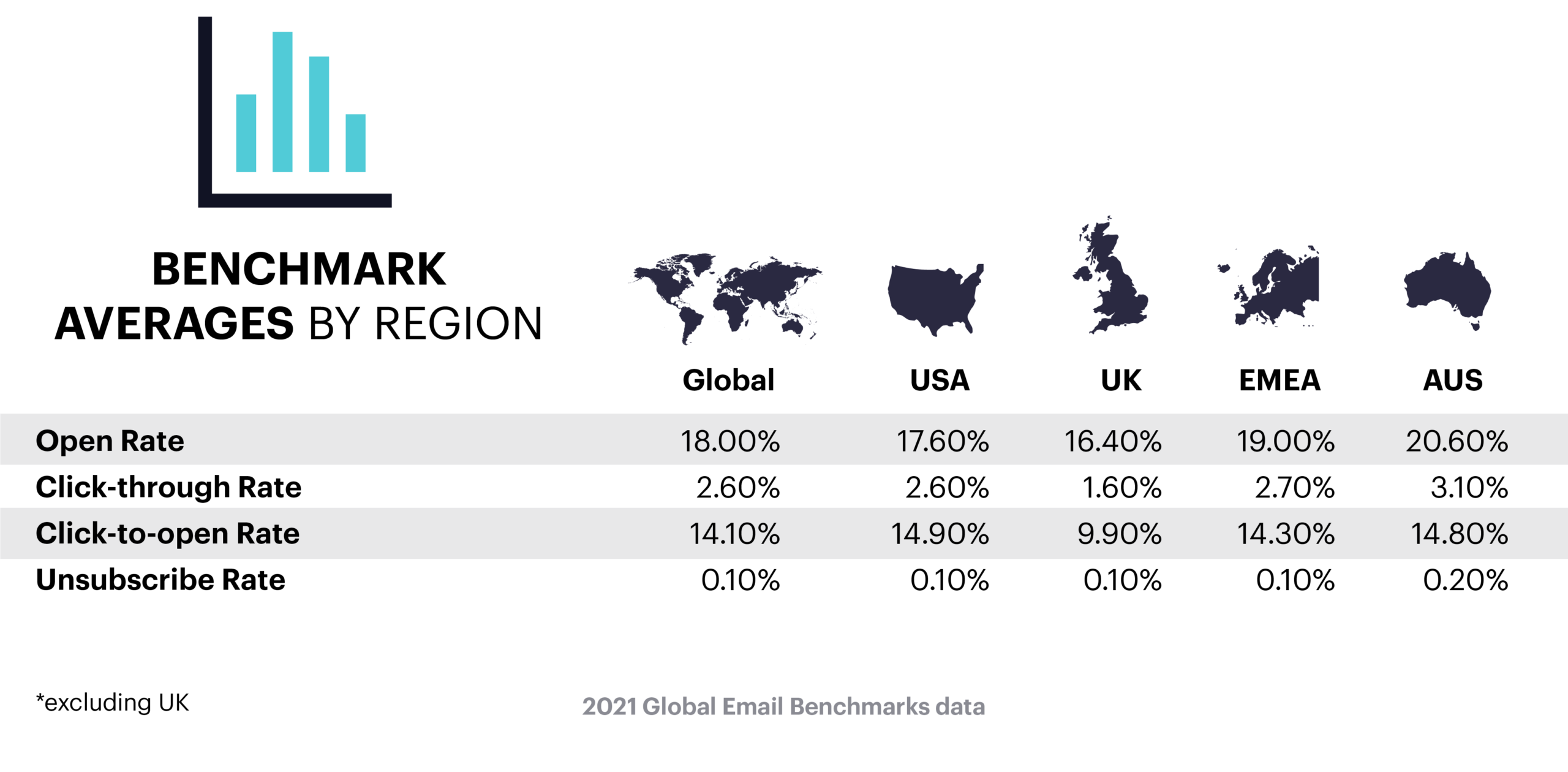
And should your revenue per open email be low, but you had high open rates, this might suggest that you’ve promoted low-ticket items or targeted too-broad audience that didn’t click-through to your site. 

What’s a good rate? 

This largely depends on your business & prices of your products or services. 

14. Revenue per subscriber 

What is it? 

Here’s another way to approach your email program’s performance: rather than looking at the total amount of money you’re making, this metric looks into how much revenue each individual subscriber makes you. 

Note: This metric is similar to the average revenue per email sent, but here we’re focusing on the # of recipients and not the # of messages sent. 

How to measure revenue per subscriber: 

Revenue per subscriber = total revenue generated by email/# of recipients whom you sent the message 

Why does it matter?  

This metric emphasizes the importance of each subscriber and can help you better evaluate individual customer segments. 

You can identify which groups perform better than others by measuring revenue per subscriber for specific customer audiences, such as those who purchase more expensive items or visit your website more frequently. 

What’s a good rate? 

This largely depends on your business & prices of your products or services. 

15. Email campaign profitability 

What is it? 

This also gives you greater insight of email marketing metrics into your campaign value. 

As with any marketing campaign, take your sales revenue and subtract the costs to run the campaign and the costs of goods sold. 

How to calculate your email campaign profitability: 

Email campaign profitability = total revenue generated by email – campaign cost – cost of goods sold 

Why does it matter? 

This metric is extremely useful, but it is also difficult to measure. 

After all, how much does it cost to run your campaigns? 

Do you only include the costs of creating, testing, and distributing your newsletter? Or do you include the cost of purchasing your list in the first place? What about other costs, such as the salaries of the people in charge of your marketing or sales? 

As you can see, there are many factors to consider. 

So, if you decide to measure your profitability, stick to one method – and explain why to your managers. 

What’s a good rate? 

Again, it’s best to compare it to your own results. 

You can then see if you’re on the right track. 

Of course, a variety of factors can have an impact on your profitability, such as your competitors or the seasonality of your business. 

Just keep that in mind as you examine your results. 

16. Delivery rate 

What is it? 

The delivery rate is how many emails are accepted by recipients’ servers. 

It depends on: 

  • the receiving domain: is it valid? 
  • the recipient’s address: does it exist? 
  • your IP: is it blocked or blacklisted? 
  • whether you’re authenticated 
  • is your sending infrastructure set up properly and transparently? 

How to calculate your delivery rate: 

Delivery rate = (# of all sent messages – bounced messages)/# all sent messages) * 100% 

17. Deliverability rate 

What is it?  

Also known as inbox placement, the deliverability rate tells you how many messages reach the recipient’s inbox or a folder (except the SPAM folder). 

There are three parts to it: 

  • Authentication: are you a genuine sender? 
  • Reputation: do recipients respond well to your emails? 
  • Content: is it relevant and expected? Is it high quality – or typical of suspicious senders? 

Vanity and actionable metrics 

Now that you’ve learned about the key email marketing KPIs and how to calculate them, I’d like to emphasize that not all email marketing metrics are created equal, and you don’t need to be concerned with all of them in the same way. 

The most important distinction is the amount of influence they have on a company’s performance and the decisions that can be made based on them. 

In the world of web analytics, we frequently distinguish between vanity and actionable metrics. This also applies to email analytics. 

Vanity metrics are appealing to the eye, but you have no control over them. They also don’t really tell you how well your company is doing. 

Need an example? 

Consider the number of people who follow your company on social media. It doesn’t matter if you have 10,000 or 100 Facebook or Twitter followers if your fans aren’t buying from you. 

Actionable metrics are those that help you determine whether or not your business is in good shape. 

Take, for example, sales revenue. If you know how much it cost to run a campaign and how much revenue it generated, you’ll have a good idea of how you’re doing. 

That doesn’t mean metrics like follower count, email open rates, or whatever else you consider “vanity metrics” aren’t useful. 

On the contrary. 

What determines whether a metric is actionable or vanity depends on the situation. 

If your job is to improve your email open rates because they indicate the reach of your marketing campaign, it will not be a vanity metric for you. 

Furthermore, while the metric may not be important on its own, when combined with another, it becomes significantly more significant. 

For example, if your open rates are low, it could indicate that your audience isn’t engaging with your communication. However, if you are also experiencing high bounce rates, you may be experiencing issues with your inbox placement. 

Simultaneously, if you’re the marketing manager for a SaaS platform and you reported that your most recent campaign generated 10,000 new users, 0.1% of whom are active, that number of new registered users could be considered a vanity metric. It’s nice to feel good, but you can’t make a good business decision unless you have more information. 

The lesson here is to always think twice before reporting any of the metrics. 

Consider whether they are actually assisting you in better understanding your business and whether there is a way to control them. 

Which email marketing KPIs do you keep your eye on? 

These are some of the most common email marketing metrics we use – or see others rely on to boost their ROI. But you might find others that suit your business better. 

Please let us know in the comments below, so we can keep this guide updated and relevant. Or simply leave some feedback. We’re all here to learn something new! 

Excited to see more? Stay tuned for more updates and stories of how our amazing team utilizes the elfoMAP platform to drive growth and offer a better experience for our own users! 

TRY elfoMAP FOR FREE